

Capvizo - Screen Capture & Visual Workspace

Overview
Capture & annotate full-page screenshots. Build visual documents with PDF, Word or ZIP exports. Includes Google Drive sync.
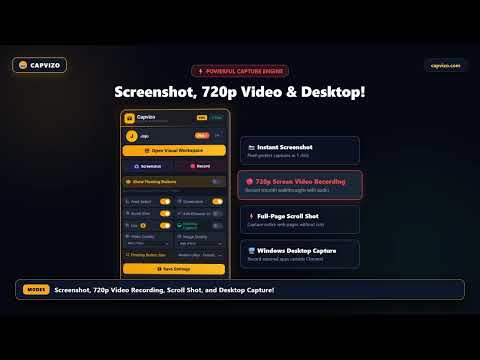
CAPVIZO — SCREENSHOT, SCREEN RECORDER & DOCUMENTATION WORKSPACE STOP WASTING HOURS ON SCREENSHOTS AND DOCUMENTATION. Capture it. Document it. Edit it. Share it. Done. Capvizo is a comprehensive visual documentation and screenshot workspace designed to help you turn screenshots, screen recordings, and web research into useful documentation—fast. Instead of capturing images, saving them in random folders, manually arranging them in a document, adding headers, creating PDFs, and sending them one by one, Capvizo brings the entire workflow together in one place. What used to take hours can now take minutes. ⚡ FROM SCREENSHOT TO DOCUMENTATION Need to quickly document a website, software issue, project, testing session, or internal process? Capture your screen, add annotations and timestamps, organize your captures, edit your layout, and export or share instantly. Your visual documentation is ready. 📸 CAPTURE EXACTLY WHAT YOU NEED • Browser & Frame Screenshot: Capture only the browser area when your work is inside Chrome. • Screenshot with Source URL: Automatically keep the webpage URL with your browser screenshots for accurate referencing. • Full-Page & Scrolling Screenshot: Capture an entire webpage from top to bottom seamlessly. • Full Desktop Screenshot: Capture your complete desktop, including multiple applications and windows. 🎥 HIGH-QUALITY SCREEN RECORDING Record your entire screen and show exactly what happened. Capture important moments from your recordings and turn them into visual documentation. Save recordings locally or upload them to Google Drive for backup and sharing. 🔗 SHARE WITH A LINK Stop downloading files just to send them. Create a shareable link for your screenshots and recordings. Use a public sharing link for general access or private sharing for controlled viewing. One link, one click, full visual context. 📄 TURN SCREENSHOTS INTO REAL DOCUMENTATION Build documentation directly from your captured content. Arrange screenshots, add text and annotations, customize headers and footers, and organize pages. No more jumping between folders, image editors, and word processors. 📝 EDITABLE DOCUMENTATION Your documentation doesn't have to stop at a screenshot. Create your visual document, edit the content, adjust the layout, and make changes before exporting. Need to update it later? Edit the existing workspace instead of starting from scratch. 📑 FLEXIBLE EXPORTS (PDF, DOCX, ZIP) • PDF Export: Create professional multi-page PDF documents from your workspace. • DOC / DOCX Export: Export your visual documentation to editable Word-compatible documents. • ZIP Export: Download your complete capture collection together as a single ZIP archive. 🚀 BUILT FOR LARGE VISUAL WORKFLOWS Whether you're collecting a few screenshots or managing large collections, Capvizo helps keep your visual work organized. Retain source URLs and keep your projects structured instead of filling your computer with disconnected files. ⏱️ TIMESTAMPS FOR REAL-WORLD DOCUMENTATION Add timestamp information to screenshots and recordings to provide clear context when timing matters. ☁️ GOOGLE DRIVE BACKUP & RESTORE Keep your important visual work backed up with Google Drive. Restore your workflow seamlessly and recover deleted content from the Trash. 🔐 LOCAL-FIRST & PRIVACY-FOCUSED Capvizo is designed with a local-first approach. Your workflow remains fast and accessible on your device, with cloud features available for backup and sharing. Your data is not sold to third parties or used for advertising. NO MORE DOCUMENTATION CHAOS. Capture it. Document it. Edit it. Share it. Capvizo — your complete visual documentation workspace.
0 out of 5No ratings
Details
- Version1.0.9
- UpdatedOctober 17, 2026
- FeaturesOffers in-app purchases
- Offered byCapvizo
- Size80.91KiB
- LanguagesEnglish (United States)
- DeveloperCapvizo
Vijay Nagar Main Rd Indore, Madhya Pradesh 452010 INEmail
joji3448@gmail.com - Non-traderThis developer has not identified itself as a trader. For consumers in the European Union, please note that consumer rights do not apply to contracts between you and this developer.
Privacy

Capvizo - Screen Capture & Visual Workspace has disclosed the following information regarding the collection and usage of your data. More detailed information can be found in the developer's privacy policy.
Capvizo - Screen Capture & Visual Workspace handles the following:
This developer declares that your data is
- Not being sold to third parties, outside of the approved use cases
- Not being used or transferred for purposes that are unrelated to the item's core functionality
- Not being used or transferred to determine creditworthiness or for lending purposes
Support
For help with questions, suggestions, or problems, visit the developer's support site