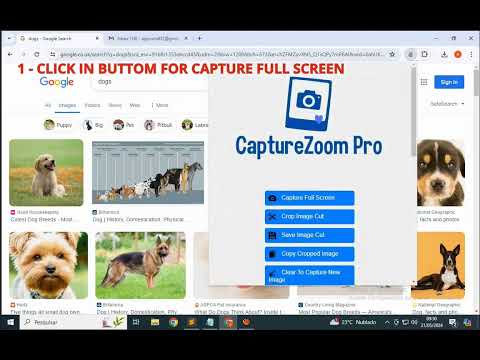
Item media 2 (screenshot) for CaptureZoom Pro
Item video thumbnail
Item media 2 (screenshot) for CaptureZoom Pro
Item video thumbnail
Item media 2 (screenshot) for CaptureZoom Pro

Overview

Manipulate Screenshots With Just A Few Clicks!

This revolutionary tool allows you to take screenshots directly from your browser with our powerful two-in-one crop, save and copy feature. Remember to respect copyright and avoid using protected content without permission. 💬Amazing Features of CaptureZoom Pro: ✓ Easy image captures. ✓ Crop to get exactly what you need. ✓ Save/Download, cropped or full screen captures, directly to your device. ✓ Copy and Paste into sites that support direct pasting into input boxes. ✓ No Login Required: No need for complicated passwords or logins. ✓ Intuitive and Secure: Enjoy an intuitive and secure interface for an unparalleled user experience. ✓ 24/7 Developer Support: Get help whenever you need it with our 24/7 support. ✓ Free version limitations: Free users face usage limitations, including a 10-second wait time between copying and pasting cropped images. Exceeding the copy limit opens a new tab directing you to our premium version page for unlimited copy and paste capabilities without waiting. ✓ Premium Version: Enjoy unlimited access to the functionality to copy and paste cropped screenshots, without limits or waiting times. This Chrome extension can be installed for online use on Mac and Windows computers. Just add it to your browser – no additional software required. This is an unofficial app independently developed and maintained. © Copyright 2024 All rights reserved.

Details

  • Version
    1.0
  • Updated
    May 24, 2024
  • Features
    Offers in-app purchases
  • Size
    293KiB
  • Languages
    English (United States)
  • Developer
    Website
    Email
    appruns832@gmail.com
  • Non-trader
    This developer has not identified itself as a trader. For consumers in the European Union, please note that consumer rights do not apply to contracts between you and this developer.

Privacy

The developer has disclosed that it will not collect or use your data. To learn more, see the developer’s privacy policy.

This developer declares that your data is

  • Not being sold to third parties, outside of the approved use cases
  • Not being used or transferred for purposes that are unrelated to the item's core functionality
  • Not being used or transferred to determine creditworthiness or for lending purposes

Support

For help with questions, suggestions, or problems, visit the developer's support site

Related

Full Page Screenshot for Google Chromeâ„¢

3.5

Free! Quickly capture full pages with just 1 click.

Fast Screenshot - One Click Capture

0.0

Capture full-page screenshots instantly with just one click. Simple, fast and lightweight tool for quick screen captures.

Full Page Screenshot

1.0

Capture full-page screenshots of any webpage

High DPI Screenshots

1.0

High DPI Screenshots makes high DPI/resolution screenshots of your website just a couple of clicks away

SnipCapture - Easy Screenshot & Snipping Tool (Selection,Visible,Full Page)

4.7

One-click screenshots of full webpages, visible areas, or selected sections. Lightweight with built-in editing.

Screenshot – Screen Capture & Editor-CocoShot

4.9

Full page, area, and desktop screenshot. Built-in screenshot editor and shortcut support for quick screen capture.

Chrome Capture - Screenshot & GIF

4.7

All-in-one screenshot + GIF capture! Take screenshots (area, full page), record screen & edit instantly.

Quick Snap

5.0

Quick Snap: Capture screenshots, upload them in google drive seamlessly.

Page Screenshot

3.7

Take a screenshot from the entire website with just one click!

Screenshot X

4.6

Screenshot X - the fastest and easiest way to take and share screenshots!

Free Screenshot Capture & Annotation Tool

5.0

Useful extension for taking screenshots and adding annotations to them. Visualize, annotate, and share screenshots in a few clicks!

Screshot - One click screen capture and editor

4.1

Capture and edit your screen in one click. Fast, simple, and built for productivity.

Full Page Screenshot for Google Chromeâ„¢

3.5

Free! Quickly capture full pages with just 1 click.

Fast Screenshot - One Click Capture

0.0

Capture full-page screenshots instantly with just one click. Simple, fast and lightweight tool for quick screen captures.

Full Page Screenshot

1.0

Capture full-page screenshots of any webpage

High DPI Screenshots

1.0

High DPI Screenshots makes high DPI/resolution screenshots of your website just a couple of clicks away

SnipCapture - Easy Screenshot & Snipping Tool (Selection,Visible,Full Page)

4.7

One-click screenshots of full webpages, visible areas, or selected sections. Lightweight with built-in editing.

Screenshot – Screen Capture & Editor-CocoShot

4.9

Full page, area, and desktop screenshot. Built-in screenshot editor and shortcut support for quick screen capture.

Chrome Capture - Screenshot & GIF

4.7

All-in-one screenshot + GIF capture! Take screenshots (area, full page), record screen & edit instantly.

Quick Snap

5.0

Quick Snap: Capture screenshots, upload them in google drive seamlessly.

Google apps