Item logo image for Capture

Capture

testastra.in
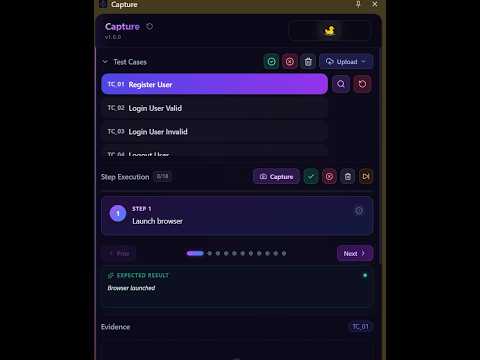
Item media 2 (screenshot) for Capture
Item video thumbnail
Item media 2 (screenshot) for Capture
Item video thumbnail
Item media 2 (screenshot) for Capture

Overview

Manual test execution and evidence capture

Capture – Manual Testing & Screenshot Documentation ⚠️ Beta Release Capture is currently in beta. You may come across bugs or unfinished features while we continue improving the extension. We'll be releasing regular updates with fixes, improvements, and new functionality. The upload test cases file should have columns TestCaseID TestCaseName Priority Module Preconditions StepNumber StepDescription TestData ExpectedResult for details visit https://testastra.in/pages/Capture Capture is built for people who spend their day documenting software—QA engineers, testers, developers, and product teams. Instead of switching between multiple tools, Capture helps you take screenshots, organize them, and generate professional testing documentation without interrupting your workflow. Features Capture screenshots quickly while testing Generate clean PDF documentation Record structured browser interactions Keep testing evidence organized Lightweight and easy to use Privacy-first by design Who is it for? QA Engineers Manual Testers Developers Business Analysts Product Teams Capture is the first product from TestAstra. It helps make manual testing more organized today while laying the foundation for future automation workflows.

Details

  • Version
    2.0.0
  • Updated
    July 13, 2026
  • Size
    1.28MiB
  • Languages
    English
  • Developer
    Sanjeet Chowdhury
    Baburchipara, colonelgola Medinipur, West Bengal 721101 IN
    Website
    Email
    sanjeetchowdhury1996@gmail.com
    Phone
    +91 70018 53665
  • Trader
    This developer has identified itself as a trader per the definition from the European Union and committed to only offer products or services that comply with EU laws.

Privacy

Manage extensions and learn how they're being used in your organization

Capture has disclosed the following information regarding the collection and usage of your data. More detailed information can be found in the developer's privacy policy.

Capture handles the following:

User activity
Website content

This developer declares that your data is

  • Not being sold to third parties, outside of the approved use cases
  • Not being used or transferred for purposes that are unrelated to the item's core functionality
  • Not being used or transferred to determine creditworthiness or for lending purposes

Support

Related

DARTSuite Extension Tools

5.0

Accessibility Testing Tools from DARTSuite.com

Katalon TestPak Extension

5.0

Katalon TestPak Extension

GeniTest AI for Salesforce

5.0

Turn Salesforce testing sessions into clear QA evidence, regression notes, and AI-assisted test reports.

Minie BugSnap

5.0

Chrome extension for testing and recording

Testing Toolkit: 15+ Essential Manual Testing Tools

4.7

Redefine manual testing with best-in-class tools, supercharged with AI. JSON Formatter, Cache Manager, Responsive testing & more

CapySplice

4.8

Capture and download sample previews while browsing Splice.

Stepture — QA Screenshots, Word Logs & Azure DevOps

0.0

Capture annotated screenshots while testing, export a Word test log, and push bugs, test cases & evidence to Azure DevOps.

9AI QA Assistant

0.0

AI-powered QA assistant: generate test checklists from user stories, capture & annotate screenshots, record screens, sync with Jira.

Testweave

0.0

Element picker and action recorder for Testweave — visual test automation

QA Capture

5.0

Session logging & screenshots

Flowster Capture: screenshots, training, SOPs

5.0

Automate screen capture & screenshots for training & standard operating procedure (SOP) workflows.

Playwright Test Recorder

0.0

Record user interactions and generate Playwright test scripts

DARTSuite Extension Tools

5.0

Accessibility Testing Tools from DARTSuite.com

Katalon TestPak Extension

5.0

Katalon TestPak Extension

GeniTest AI for Salesforce

5.0

Turn Salesforce testing sessions into clear QA evidence, regression notes, and AI-assisted test reports.

Minie BugSnap

5.0

Chrome extension for testing and recording

Testing Toolkit: 15+ Essential Manual Testing Tools

4.7

Redefine manual testing with best-in-class tools, supercharged with AI. JSON Formatter, Cache Manager, Responsive testing & more

CapySplice

4.8

Capture and download sample previews while browsing Splice.

Stepture — QA Screenshots, Word Logs & Azure DevOps

0.0

Capture annotated screenshots while testing, export a Word test log, and push bugs, test cases & evidence to Azure DevOps.

9AI QA Assistant

0.0

AI-powered QA assistant: generate test checklists from user stories, capture & annotate screenshots, record screens, sync with Jira.

Google apps