

Capture

Overview
Capture, edit, and save screenshots directly from Chrome. Private: everything stays on your computer.
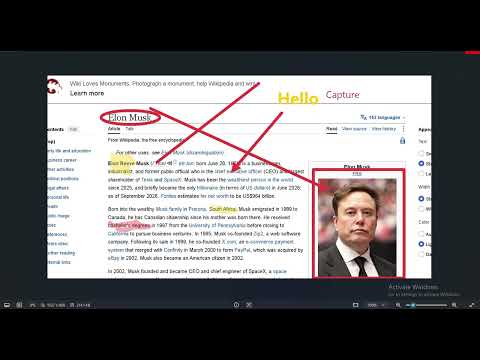
A fast, simple screenshot tool for Chrome that lets you capture visible areas, full webpages, selected regions, and browser tabs. See it → Capture it → Edit it → Save it. No account, no cloud, no tracking. Screenshots never leave your computer. Features Capture modes: Visible Area, Full Page, Selected Area, Current Tab Countdown: none / 3 / 5 / 10 seconds, cancellable (button or Esc) Keyboard shortcut: `Ctrl+Shift+S` (`Cmd+Shift+S` on Mac) runs your default mode Editor: crop, draw, arrow, rectangle, circle, line, text, highlight, blur, pixelate, undo/redo, clear, zoom Output: copy to clipboard, download PNG/JPG (quality slider), rename, open full-size in a new tab History: local thumbnails + images, open / download / delete / clear, can be turned off Light / dark / system theme, settings page
0 out of 5No ratings
Details
- Version1.0.0
- UpdatedOctober 7, 2026
- Size39.4KiB
- LanguagesEnglish (United States)
- Developer
Email
pratapbuilds369@gmail.com - Non-traderThis developer has not identified itself as a trader. For consumers in the European Union, please note that consumer rights do not apply to contracts between you and this developer.
Privacy

Capture has disclosed the following information regarding the collection and usage of your data. More detailed information can be found in the developer's privacy policy.
Capture handles the following:
This developer declares that your data is
- Not being sold to third parties, outside of the approved use cases
- Not being used or transferred for purposes that are unrelated to the item's core functionality
- Not being used or transferred to determine creditworthiness or for lending purposes