

Capture Full Page - Screenshot Editor

Overview
Capture, edit, and save full page, area, and visible screenshots in Chrome. 100% local, no sign-up.
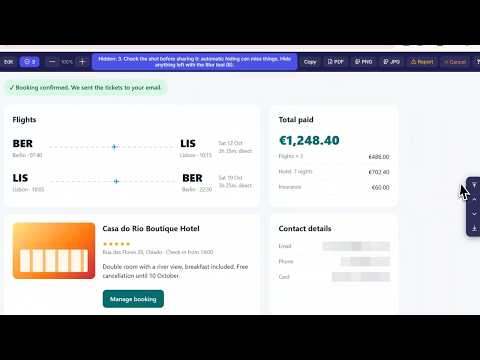
Capture Full Page is a screenshot extension for Chrome that takes a full page screenshot of any website in one click. The page scrolls by itself and is saved as one long image. You can also capture a selected area or the visible screen, then annotate the screenshot, blur private data, and save it as PNG, JPG or PDF. Everything works on your computer. No uploads, no account, no sign-up. 📸 ━━━ Full Page Screenshot ━━━ Click the extension icon to capture the entire webpage, from top to bottom. The page scrolls for you, so long articles, reports, dashboards, online stores, chats and email come out as one scrolling screenshot. ✂️ ━━━ Area Screenshot ━━━ Drag to select any part of a page. Move or resize the selection before you capture it. The selection can go below the screen: the page scrolls as you drag. 🖥️ ━━━ Visible Screen Screenshot ━━━ A quick screen capture of exactly what you see in the browser window. ⚡ ━━━ Quick to Use ━━━ • Click the icon to take a full page screenshot, or set the click to open the menu instead • Right-click the icon for Area, Screen or the settings • Keyboard shortcuts: Alt+Shift+F (full page), Alt+Shift+A (area), Alt+Shift+S (screen) • A 3, 5 or 10 second delay for menus, tooltips and hover states • Press Esc to stop a long capture • Choose what happens after a capture: open the editor, or save the file right away 🎨 ━━━ Screenshot Editor ━━━ By default, every screenshot opens in the built-in editor. Annotate, crop and blur it before you save: ➤ Arrows and lines ➤ Rectangles, outlined or filled ➤ Text and callouts ➤ Numbered steps ➤ Highlighter and pencil ➤ Emoji and stickers ➤ Blur or pixelate ➤ Crop ➤ Eraser Anything you draw can be changed later. Move it, resize it, change its color, or double-click a text to edit it. Undo, redo and zoom are always there. 🛡️ ━━━ Blur Personal Data in One Click ━━━ Before you share a screenshot, the editor finds emails, phone numbers, card numbers and password fields on the page. Click the shield button to blur all of them at once. Click it again to show them. This runs on your computer, and nothing is sent anywhere. 💾 ━━━ Save as PNG, JPG or PDF ━━━ Save a webpage as an image or as a PDF: 🔵 PNG: sharp on any screen 🔵 JPG: smaller files 🔵 PDF: split into pages, ready to print or send 🔵 Copy to clipboard: paste into a chat, an email or a document Save As lets you rename the file and pick a folder. Very long pages are saved as a PDF or as several PNG files. 🧩 ━━━ Works on Hard Pages ━━━ ✅ Web apps where only part of the page scrolls, like email, chats and dashboards ✅ Pop-up windows that scroll inside ✅ Sticky headers and chat buttons are hidden, so they don't repeat down the screenshot ✅ High-resolution screens ✅ Screen and Area also work on the Chrome Web Store and Chrome's own pages 🔒 ━━━ Private ━━━ Your screenshots stay on your computer. They are made inside Chrome and never uploaded. ♦️ No uploads ♦️ No analytics or tracking ♦️ No account ♦️ No personal data collected Privacy Policy: https://www.capture-full-page.com/privacy-policy 🌍 52 languages. Light and dark theme. 🔑 ━━━ Permissions, Explained ━━━ Each one is used only for what's stated: ♦️ activeTab: take a screenshot of the current tab ♦️ downloads: save the screenshot file ♦️ storage: remember your settings ♦️ scripting: measure the page and scroll it during capture ♦️ clipboardWrite: copy the screenshot ♦️ contextMenus: the right-click menu on the icon ♦️ host permissions (all_urls): take screenshots on any website 🎯 ━━━ Get Started ━━━ Install Capture Full Page, open any website and click the icon to take your first full page screenshot.
4.9 out of 582 ratings
Details
- Version2.0.24
- UpdatedOctober 17, 2026
- Size1.3MiB
- Languages52 languages
- DeveloperWebsite
Email
capturefullpage@gmail.com - Non-traderThis developer has not identified itself as a trader. For consumers in the European Union, please note that consumer rights do not apply to contracts between you and this developer.
Privacy

Capture Full Page - Screenshot Editor has disclosed the following information regarding the collection and usage of your data. More detailed information can be found in the developer's privacy policy.
Capture Full Page - Screenshot Editor handles the following:
This developer declares that your data is
- Not being sold to third parties, outside of the approved use cases
- Not being used or transferred for purposes that are unrelated to the item's core functionality
- Not being used or transferred to determine creditworthiness or for lending purposes