

Capture Full Page Screenshots - SnapNova

Overview
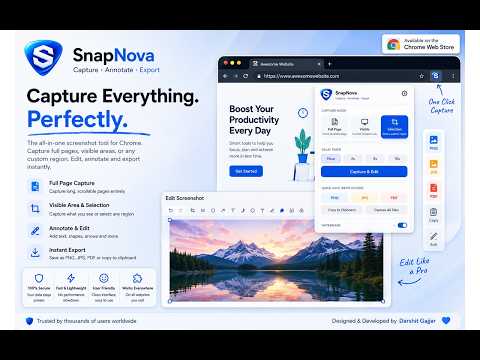
Full-page, visible-area & region screenshots. Annotate, blur, watermark. Export PNG/JPEG/PDF. 100% local, no data sent out.
SnapNova – Full Page Screenshot & Annotation Tool Capture, annotate, and export screenshots of any webpage — instantly and privately. SnapNova works 100% locally in your browser. No account, no cloud, no data ever leaves your device. --- CAPTURE MODES - Full Page – Scrolls and stitches the entire page into one image - Visible Area – Captures exactly what you see on screen - Region / Selection – Draw a box to capture any specific area - Delay Timer – Set a countdown before capture (great for dropdowns & tooltips) - Capture All Tabs – Screenshot every open tab in one click --- POWERFUL ANNOTATION EDITOR Open any screenshot in the built-in editor and annotate with: - Arrow – Point to important areas - Rectangle & Ellipse – Highlight sections - Text – Add labels and notes - Pencil – Freehand drawing - Highlighter – Mark key content - Blur / Pixelate – Redact sensitive information - Numbered Markers – Step-by-step callouts (auto-increments) - Crop – Trim to exactly what you need - Undo / Redo with full history - Zoom in/out for precise editing --- WATERMARK - Text watermark – corner or full-tile diagonal repeat - Logo watermark – upload your own image - Control position, opacity, and size --- EXPORT OPTIONS - Save as PNG (lossless, full resolution) - Save as JPEG - Save as PDF (multi-page for tall pages) - Copy to Clipboard - Print --- RECENT CAPTURES Access your last 5 screenshots directly from the popup. Click any thumbnail to reopen it in the editor. --- KEYBOARD SHORTCUTS & CONTEXT MENU Right-click any page to capture from the context menu. Use keyboard shortcuts (V, T, A, R, E, P, H, B, N, Ctrl+Z, Ctrl+Y) for fast annotation. --- PRIVACY FIRST SnapNova runs entirely in your browser. No servers, no tracking, no sign-in required.
4.8 out of 55 ratings
Details
- Version1.0.0
- UpdatedSeptember 12, 2026
- Size272KiB
- LanguagesEnglish (United States)
- DeveloperDARSHIT H GAJJARWebsite
C-14 ROYAL PARK SOCIETY, Kadi (M + OG), Kadi, Mahesana,, Gujarat 382715 INEmail
darshit.gajjar1998@gmail.comPhone
+91 79845 52350 - TraderThis developer has identified itself as a trader per the definition from the European Union and committed to only offer products or services that comply with EU laws.
Privacy

This developer declares that your data is
- Not being sold to third parties, outside of the approved use cases
- Not being used or transferred for purposes that are unrelated to the item's core functionality
- Not being used or transferred to determine creditworthiness or for lending purposes