

Capture Full Page - Full Page Screenshot, Editor & PDF

Overview
Screenshot a whole web page, a selected area or the visible screen. Add arrows, text and blur, then save as PNG, JPG or PDF.
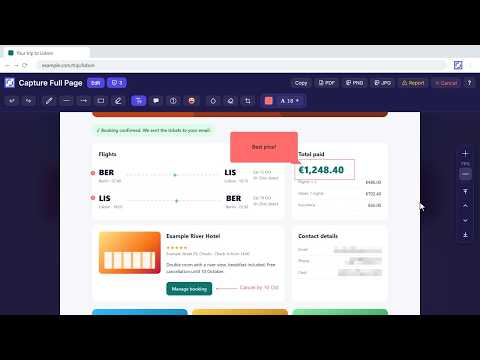
Capture Full Page takes a full page screenshot of any website in one click. The page scrolls by itself, so the whole page comes out as one long screenshot. You can also capture a selected area or the visible screen, add arrows, text and blur, and save the result as PNG, JPG or PDF. Screenshots are made inside Chrome and stay on your computer. You don't need an account to take and edit them. 📸 ━━━ Full Page Screenshot ━━━ Click the extension icon to capture the entire webpage, from top to bottom. Long articles, reports, dashboards, online stores, chats and email come out as one scrolling screenshot. ✂️ ━━━ Area Screenshot ━━━ Drag to select any part of a page. Move or resize the selection before you capture it. The selection can go below the screen: the page scrolls as you drag. 🖥️ ━━━ Visible Screen ━━━ A quick capture of exactly what you see in the browser window. ⚡ ━━━ Quick to Use ━━━ • Click the icon for a full page screenshot, or set the click to open the menu instead • Right-click the icon for Area, Screen, Open an image, or the menu and settings • Keyboard shortcuts: Alt+Shift+F (full page), Alt+Shift+A (area), Alt+Shift+S (screen) • A 3, 5 or 10 second delay for menus, tooltips and hover states • Press Esc to stop a long capture • Choose what happens after a capture: open the editor, or save the file right away 🎨 ━━━ Screenshot Editor ━━━ Every capture opens in the built-in editor, where you can mark it up before you save: ➤ Arrows and lines ➤ Rectangles, outlined or filled ➤ Text and callouts ➤ Numbered steps ➤ Highlighter and pencil ➤ Emoji and stickers ➤ Blur or pixelate ➤ Crop ➤ Eraser Anything you draw can be changed later: move it, resize it, change its color, or double-click a text to edit it. Undo, redo and zoom are always there. Took a screenshot outside Chrome? Press Ctrl+Shift+0 (Command+Shift+0 on a Mac) to open it from the clipboard in the same editor. 🛡️ ━━━ Find Personal Data Before You Share ━━━ The shield looks for emails, phone numbers, card numbers and password fields on the captured page and shows what it found, so you can hide them before sending the image. Anything else, like names or addresses, can be covered with the Blur tool. The check runs on your computer. 💾 ━━━ Save as PNG, JPG or PDF ━━━ 🔵 PNG: sharp on any screen 🔵 JPG: smaller files 🔵 PDF: split into pages, ready to print or send 🔵 Copy to clipboard: paste into a chat, an email or a document Save As lets you rename the file and pick a folder. Very long pages are saved as a PDF or as several PNG files. 🧩 ━━━ Works on Hard Pages ━━━ ✅ Web apps where only part of the page scrolls, like email, chats and dashboards ✅ Pop-up windows that scroll inside ✅ Sticky headers and chat buttons are hidden, so they don't repeat down the screenshot ✅ High-resolution screens ✅ Screen and Area also work on the Chrome Web Store and Chrome's own pages 🔒 ━━━ Private by Design ━━━ ♦️ Screenshots are made inside Chrome and are never uploaded ♦️ Page content is not sent to any server ♦️ You don't need an account to capture, edit and save Privacy Policy: https://www.capture-full-page.com/privacy-policy 🌍 52 languages. Light and dark theme. 🔑 ━━━ Permissions, Explained ━━━ Each one is used only for what's stated: ♦️ activeTab: capture the current tab ♦️ downloads: save the image file ♦️ storage: remember your settings ♦️ scripting: measure the page and scroll it during capture ♦️ clipboardWrite: copy the image ♦️ contextMenus: the right-click menu on the icon ♦️ host permissions (all_urls): capture any website 🎯 ━━━ Get Started ━━━ Install Capture Full Page, open any website and click the icon to take your first full page screenshot.
5.0 out of 594 ratings
Details
- Version2.0.30
- UpdatedNovember 27, 2026
- Size1.43MiB
- Languages52 languages
- DeveloperWebsite
Email
capturefullpage@gmail.com - Non-traderThis developer has not identified itself as a trader. For consumers in the European Union, please note that consumer rights do not apply to contracts between you and this developer.
Privacy

Capture Full Page - Full Page Screenshot, Editor & PDF has disclosed the following information regarding the collection and usage of your data. More detailed information can be found in the developer's privacy policy.
Capture Full Page - Full Page Screenshot, Editor & PDF handles the following:
This developer declares that your data is
- Not being sold to third parties, outside of the approved use cases
- Not being used or transferred for purposes that are unrelated to the item's core functionality
- Not being used or transferred to determine creditworthiness or for lending purposes