


Overview
Capture full-page & area screenshots, then find any of them instantly with AI + OCR search. Never lose a screenshot again.
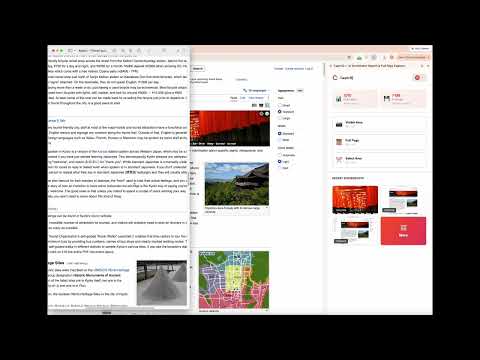
CaptrIQ — the AI screenshot tool that actually remembers. Take a screenshot the normal way, then find it again weeks or months later just by typing what you remember. CaptrIQ captures the visible area, a full scrolling web page, or any region you select — then uses OCR and AI to read and understand every capture, so your screenshots become a searchable library instead of a folder you never open again. Most screenshot and screen-capture extensions are capture-and-forget: you snap, download to a messy Downloads folder, and never see it again. CaptrIQ is capture-and-find. Search "the invoice from last month," "that error message," or "the pricing table I saw" and the right screenshot appears instantly — even when the words live inside the image. 📸 THREE WAYS TO CAPTURE ANY PAGE • Visible area — grab what's on screen in one click (Ctrl+Shift+S) • Full page screenshot — capture long, scrolling pages top to bottom, automatically stitched, with lazy-loaded images forced and sticky headers and cookie banners handled so you get one clean image (Ctrl+Shift+F) • Select area — drag to capture exactly the region you want (Ctrl+Shift+A) On Mac, shortcuts use Alt+Shift. You can also capture from the toolbar button, the right-click menu, or the side panel. 🔍 FIND ANY SCREENSHOT WITH AI + OCR • Automatic OCR extracts the text inside every screenshot • AI-powered search across both the text and the visual content of your captures • Just type what you remember — no folders, no file names, no endless scrolling. CaptrIQ finds it. ☁️ AN ORGANIZED, SYNCED CLOUD LIBRARY • Every capture is saved to your account and synced across your devices • A clean, searchable side-panel library — not hundreds of untitled PNGs • Open, download, copy, or share any screenshot from anywhere 🔒 PRIVATE BY DESIGN • Built-in PII redaction blurs sensitive details before you share • Your screenshots stay private to your account • No ads. No tracking. Built on Manifest V3. ⚡ BUILT FOR SPEED • Toolbar button, context menu, native side panel, and keyboard shortcuts • Lightweight and fast — capture without breaking your flow WHO IT'S FOR • Researchers and students who save sources and want to search them later • Designers and product managers collecting UI references and inspiration • Support, QA, and engineering teams keeping error messages, stack traces, and repro steps • Freelancers and shoppers saving receipts, invoices, and confirmations they always lose • Anyone who takes dozens of screenshots a week and can never find the one they need WHY PEOPLE LOVE CAPTRIQ Other tools help you take a screenshot. CaptrIQ helps you take it AND find it again. Full-page capture, area capture, and cloud sharing are all here — plus instant AI search across everything you have ever captured, so a screenshot is never lost again. FREE TO START CaptrIQ is free to use. Upgrade to Pro or Team for higher capture and storage limits, OCR search across your entire library, longer retention, PII redaction, and shared team workspaces. Stop losing screenshots in your Downloads folder. Install CaptrIQ and make every capture searchable for good. Privacy policy: https://captriq.com/privacy Questions? support@captriq.com
0 out of 5No ratings
Details
- Version1.0.0
- UpdatedJuly 14, 2026
- FeaturesOffers in-app purchases
- Size296KiB
- LanguagesEnglish (United States)
- DeveloperWebsite
Email
support@narma.tech - Non-traderThis developer has not identified itself as a trader. For consumers in the European Union, please note that consumer rights do not apply to contracts between you and this developer.
Privacy

CaptrIQ — AI Screenshot Search & Full Page Capture has disclosed the following information regarding the collection and usage of your data. More detailed information can be found in the developer's privacy policy.
CaptrIQ — AI Screenshot Search & Full Page Capture handles the following:
This developer declares that your data is
- Not being sold to third parties, outside of the approved use cases
- Not being used or transferred for purposes that are unrelated to the item's core functionality
- Not being used or transferred to determine creditworthiness or for lending purposes
Support
For help with questions, suggestions, or problems, visit the developer's support site