


Overview
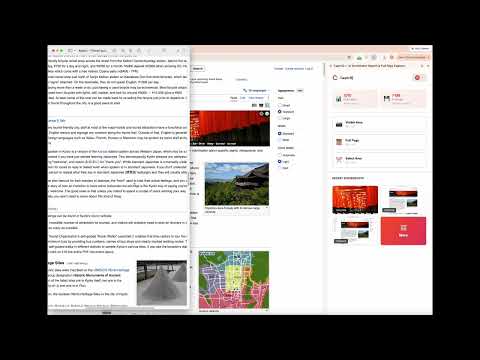
Full-page screenshots, free with no account. Saved on your computer first; sign in to search them by the text inside.
CaptrIQ is the ultimate screenshot management tool powered by AI. Never lose track of your screenshots again! 🎯 KEY FEATURES: 📸 Smart Screenshot Capture • Visible area capture (Ctrl+Shift+S) • Full-page capture (Ctrl+Shift+F) • Selection capture (Ctrl+Shift+A) • Right-click context menu • Automatic upload and organization when signed in 🆓 No Sign-Up Required • Capture and keep screenshots in a local library on your device, no account needed • Download as PNG, JPG or PDF • Sign in to unlock your cloud library, OCR, search and Copy for AI 🔍 AI-Powered Search • Find screenshots instantly with natural language • Search by content, not just filename • Smart categorization and tagging ☁️ Cloud Storage & Sync • Automatic backup to cloud • Access from any device • Secure encrypted storage ✨ Pro Features • Unlimited screenshots • Advanced AI search • Priority support • Team collaboration (coming soon) 🔒 Privacy & Security • End-to-end encryption • Anonymous usage statistics only (no URLs, titles or screenshots); opt out in Settings • GDPR compliant • Your data stays yours Perfect for: ✓ Developers documenting bugs ✓ Designers collecting inspiration ✓ Students organizing research ✓ Professionals managing workflows ✓ Anyone who takes screenshots Get started free today! Upgrade to Pro for unlimited screenshots and advanced features. Support: support@captriq.com Privacy: https://captriq.com/privacy
5 out of 51 rating
Details
- Version1.2.0
- UpdatedNovember 6, 2026
- FeaturesOffers in-app purchases
- Size374KiB
- LanguagesEnglish (United States)
- DeveloperWebsite
Email
support@narma.tech - Non-traderThis developer has not identified itself as a trader. For consumers in the European Union, please note that consumer rights do not apply to contracts between you and this developer.
Privacy

CaptrIQ — AI Screenshot Search & Full Page Capture has disclosed the following information regarding the collection and usage of your data. More detailed information can be found in the developer's privacy policy.
CaptrIQ — AI Screenshot Search & Full Page Capture handles the following:
This developer declares that your data is
- Not being sold to third parties, outside of the approved use cases
- Not being used or transferred for purposes that are unrelated to the item's core functionality
- Not being used or transferred to determine creditworthiness or for lending purposes
Support
For help with questions, suggestions, or problems, visit the developer's support site