


Overview
Capture, organize, and find screenshots instantly. One-click snipping tool with organization into workbooks and folders.
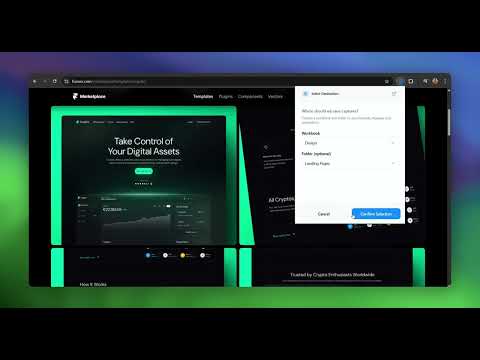
Transform how you manage screenshots with Captop - the intelligent visual knowledge system that turns scattered captures into an organized library. 🎯 Why Captop? Never lose a screenshot again. Whether you're a student saving course materials, a designer collecting inspiration, or a researcher documenting findings, Captop makes visual organization effortless. ✨ Key Features • One-Click Capture - Professional snipping tool with precise area selection • Auto-Organization - Screenshots automatically save to your selected workbook and folder • Universal Compatibility - Works on any website or web application • Instant Sync - Seamlessly integrates with your Captop workspace • Privacy First - All data stored locally on your device • No Manual Filing - Set your destination once, capture forever 🚀 How It Works Install the extension and open the Captop web app Create workbooks and folders to organize your captures Select your default destination in the extension Click the extension icon and start capturing Your screenshots are automatically organized and searchable 💡 Perfect For • Students organizing course materials and research • Designers building inspiration libraries • Developers documenting bugs and features • Researchers collecting visual data • Anyone who takes screenshots regularly 🔒 Privacy & Security Your data stays yours. All screenshots and notes are stored locally using IndexedDB - no cloud uploads, no third-party access. Work offline anytime. 🎓 Learn More Visit captop.in to create your free account and start organizing your visual knowledge today.
0 out of 5No ratings
Details
- Version1.2.0
- UpdatedDecember 12, 2025
- Size236KiB
- LanguagesEnglish
- Developer
- Non-traderThis developer has not identified itself as a trader. For consumers in the European Union, please note that consumer rights do not apply to contracts between you and this developer.
Privacy

Captop - Screenshot Organizer Chrome Extension has disclosed the following information regarding the collection and usage of your data. More detailed information can be found in the developer's privacy policy.
Captop - Screenshot Organizer Chrome Extension handles the following:
This developer declares that your data is
- Not being sold to third parties, outside of the approved use cases
- Not being used or transferred for purposes that are unrelated to the item's core functionality
- Not being used or transferred to determine creditworthiness or for lending purposes
Support
For help with questions, suggestions, or problems, please open this page on your desktop browser