

Caption AI

Overview
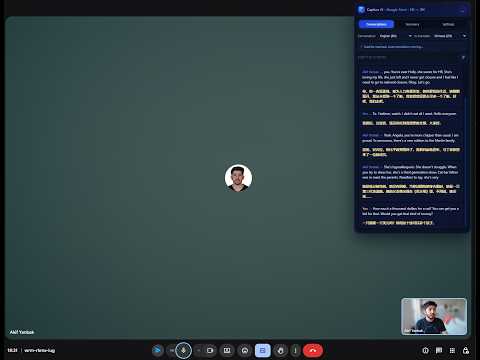
Caption AI captures Google Meet subtitles and translates them in real time with AI.
Caption AI — Real-Time Translator & Meeting Assistant for Google Meet Caption AI is a Chrome extension that translates Google Meet captions into your language in real time and provides intelligent summaries, using your own AI provider's API key. Features Real-time translation — Captions are automatically translated as the conversation happens. Supports 21 languages including English, Spanish, Japanese, Arabic, and more. Meeting history — Your meeting transcripts are securely saved in your local browser storage. Access them anytime with a single click. Smart summaries — Generate a concise, intelligent summary of everything discussed with just one click at the end of your meeting. Chat with AI — Chat directly with the AI using your saved meeting notes as context to extract actionable insights or ask specific questions. Context support & Custom prompts — Add context like "medical conference" or use custom prompts to perfectly translate industry jargon and tailor your AI outputs. BYOK (Bring Your Own Key) — Maximum privacy and flexibility. Use your own API key from your preferred AI provider. Your data is never stored on our servers. Distraction-free overlay — A seamless, resizable translation panel sits directly inside Google Meet — no tab switching needed.
0 out of 5No ratings
Details
- Version0.1.53
- UpdatedMay 15, 2026
- Offered bymakifyanbak
- Size164KiB
- Languages20 languages
- Developer
Email
makifyanbak@gmail.com - Non-traderThis developer has not identified itself as a trader. For consumers in the European Union, please note that consumer rights do not apply to contracts between you and this developer.
Privacy

This developer declares that your data is
- Not being sold to third parties, outside of the approved use cases
- Not being used or transferred for purposes that are unrelated to the item's core functionality
- Not being used or transferred to determine creditworthiness or for lending purposes
Support
For help with questions, suggestions, or problems, visit the developer's support site