


Overview
Export any Capterra product's reviews to CSV, Excel or JSON: ratings, the four sub-ratings, pros, cons and dates.
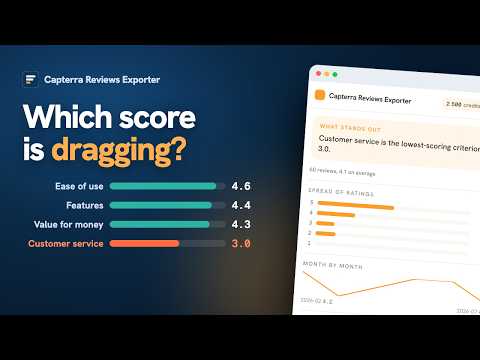
Export the reviews of any Capterra product listing to CSV, Excel or JSON, straight from your browser. Capterra asks reviewers to score a product on several criteria, not one. That is the whole value, and it is exactly what a single star average destroys. This exporter gives every sub-rating its own column, so you can tell whether the problem is the product, the price or the support before you sit through a demo. What you get, one row per review: - Overall rating, review title, review text - Ease of Use, Features, Customer Service and Value for Money, each as its own column - Pros and cons as separate columns - Review date A sub-rating the reviewer left unrated stays empty. It is never turned into a zero, which would invent a bad score for the vendor. Pricing - The first 25 exported rows are free. No account needed. - Credit packs from 2.99 USD: 1 credit = 1 exported row. Credits never expire. - Unlimited: 8.99 USD per month, cancel anytime. - One balance is shared across every ExportReviews exporter. Privacy - Extraction runs in your own browser session, on the page you opened. - The exported reviews never reach our servers. The file is written on your machine. - Our backend only holds your account email, your credit balance and Stripe billing identifiers. - Sign-in is a 6-digit code sent by email. There is no password. Independent tool, not affiliated with Capterra. Capterra is a trademark of its owner and is used here only to name the site this extension works on.
0 out of 5No ratings
Details
- Version1.0.0
- UpdatedOctober 5, 2026
- FeaturesOffers in-app purchases
- Size372KiB
- Languages6 languages
- DeveloperStyle Beauty LLCWebsite
1021 E Lincolnway Suite 5855 Cheyenne, WY 82001-4851 USEmail
support@novastack.coPhone
+1 209-435-8160 - TraderThis developer has identified itself as a trader per the definition from the European Union and committed to only offer products or services that comply with EU laws.
Privacy

Capterra Reviews Exporter: Export Reviews to CSV & Excel has disclosed the following information regarding the collection and usage of your data. More detailed information can be found in the developer's privacy policy.
Capterra Reviews Exporter: Export Reviews to CSV & Excel handles the following:
This developer declares that your data is
- Not being sold to third parties, outside of the approved use cases
- Not being used or transferred for purposes that are unrelated to the item's core functionality
- Not being used or transferred to determine creditworthiness or for lending purposes
Support
For help with questions, suggestions, or problems, please open this page on your desktop browser