


Overview
Keep company data out of AI tools: block, warn or mask pastes, and stop risky uploads and downloads.
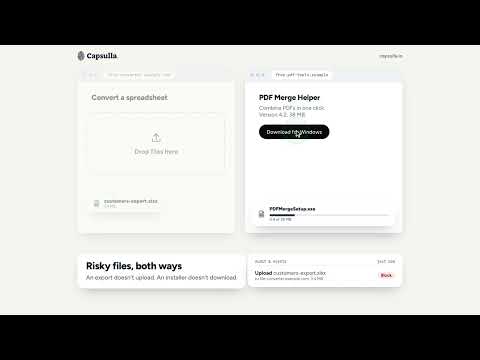
Most data leaks don't happen through sophisticated attacks. They happen when someone pastes a card number into a support ticket, drags a customer spreadsheet into an AI chatbot, or downloads a file they shouldn't have. Capsulla catches it before it leaves your browser — right inside the sites and apps you already use. ⚫ Real-time clipboard protection Capsulla checks what you paste before it lands — credit card numbers, IBANs, US Social Security numbers, AWS keys and private keys are caught automatically. Depending on the rule, Capsulla warns you, blocks the paste entirely, or masks just the sensitive part and lets the rest through. ⚫ Luhn-verified card detection Card-number matches are checked against a Luhn checksum before Capsulla reacts — so a random 16-digit number in a spreadsheet doesn't trigger a false alarm, but a real card number does. ⚫ File upload & download protection Capsulla blocks uploads and downloads by file type — stop an executable from being downloaded, or a spreadsheet from being dragged into the wrong upload field, before it happens. ⚫ Runs entirely in your browser What you paste, upload, or download is checked locally, the moment you act. The content itself never leaves your device — Capsulla doesn't send it anywhere, ever. ⚫ Custom rules, your patterns The built-in rules cover the common cases, but you're not limited to them. Add your own patterns — email addresses, phone numbers, client IDs — choose whether Capsulla should warn, block, or mask, and tune it to what your work actually involves. ⚫ Trusted domains Whitelist the sites you use internally — your own tools, your own docs, your own trackers — so Capsulla stays out of the way where it doesn't need to be. ⚫ For companies on Google Workspace Deploy Capsulla to every browser from Google Admin and run it from one console: rules for the whole organization and a log of every match — when, which site, whose browser, which rule. Never the content. More at capsulla.io. Support: hello@capsulla.io
5 out of 52 ratings
Details
- Version3.1
- UpdatedOctober 27, 2026
- Size617KiB
- Languages13 languages
- DeveloperWebsite
Email
contact@lockisecurity.com - Non-traderThis developer has not identified itself as a trader. For consumers in the European Union, please note that consumer rights do not apply to contracts between you and this developer.
Privacy

Capsulla has disclosed the following information regarding the collection and usage of your data. More detailed information can be found in the developer's privacy policy.
Capsulla handles the following:
This developer declares that your data is
- Not being sold to third parties, outside of the approved use cases
- Not being used or transferred for purposes that are unrelated to the item's core functionality
- Not being used or transferred to determine creditworthiness or for lending purposes
Support
For help with questions, suggestions, or problems, visit the developer's support site