

CapSend
1 rating
)
Overview
Capture any webpage region, add a typed or spoken prompt, and prepare it in your preferred AI.
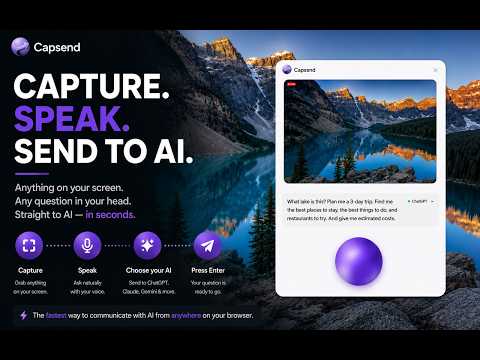
Capture. Speak. Send to AI. Capsend turns what you're looking at into a ready-to-use AI prompt — fast. Capture → Speak → Choose your AI → Press Enter Capture anything on your screen. The moment your screenshot is captured, the mic is ready. Just start talking. As you speak, Capsend writes your prompt for you in real time. Add details, explain what you want, ask a complicated question — say everything that's in your head without having to type it all out. Prefer typing? You can always type instead. Choose your AI — ChatGPT, Claude, Gemini, Grok, or Copilot. Press Enter. Capsend takes your screenshot + prompt and puts them together in your AI — ready to go. Your screenshot. Better prompts. Faster. A visual plus a detailed prompt is a very powerful combination. Your screenshot gives AI the visual context. Your words give it the details, instructions, questions, and intent that can take much longer to type. Capsend brings them together. Capture what you see. Speak everything you want AI to know. Capsend turns your words into a detailed prompt and gets the visual + prompt to your AI — fast. More context. More detail. Less effort. Talk faster than you type. The more detail you want to give AI, the more time you normally spend typing. So don't type it all. Say it. Capsend automatically turns your voice into a written prompt while your screenshot gives AI the visual information you're talking about. That means less time describing what's already on your screen — and more freedom to give AI the detailed instructions, questions, and context you actually have in mind. Skip the busywork. No saving screenshots. No uploading images. No hunting for your AI tab — Capsend can use one that's already open or open a new one for you. No clicking through tabs and input boxes. No copying and pasting. No switching back and forth. No typing paragraphs explaining what's already on your screen. Capture it. Speak your prompt. Press Enter. Less clicking. Less typing. More asking. Built for speed. Open Capsend without breaking your workflow: Capture + Voice Windows/Linux: Ctrl + Shift + Space Mac: Option + Z Voice Only Windows/Linux: Ctrl + Space Mac: Option + V Want a different shortcut? Chrome lets you customize it. Try CapSend free. CapSend includes 15 successful handoffs across Capture + Voice and Voice Only. Failed handoffs don't count toward your trial. After the free trial, upgrade to CapSend Unlimited for $4.99/month. Cancel anytime. Privacy by design. Capsend does not store your screenshots, prompts, or transcripts. Your screenshot and prompt are handled temporarily while you use the extension. Voice transcription uses your browser's speech-recognition capabilities. Capture. Speak. Send to AI.
5 out of 51 rating
Details
- Version1.3.1
- UpdatedAugust 27, 2026
- FeaturesOffers in-app purchases
- Offered byCapsend
- Size1.18MiB
- LanguagesEnglish (United States)
- Developersean michael lopez
22114 Scallion Dr Santa Clarita, CA 91350-2180 USEmail
capsendco@gmail.comPhone
+1 818-641-7418 - TraderThis developer has identified itself as a trader per the definition from the European Union and committed to only offer products or services that comply with EU laws.
Privacy

CapSend has disclosed the following information regarding the collection and usage of your data. More detailed information can be found in the developer's privacy policy.
CapSend handles the following:
This developer declares that your data is
- Not being sold to third parties, outside of the approved use cases
- Not being used or transferred for purposes that are unrelated to the item's core functionality
- Not being used or transferred to determine creditworthiness or for lending purposes
Support
For help with questions, suggestions, or problems, visit the developer's support site