

Capnotate — Visual AI Annotator

Overview
Capture and annotate screens, save multi-capture projects, and prepare AI chat drafts.
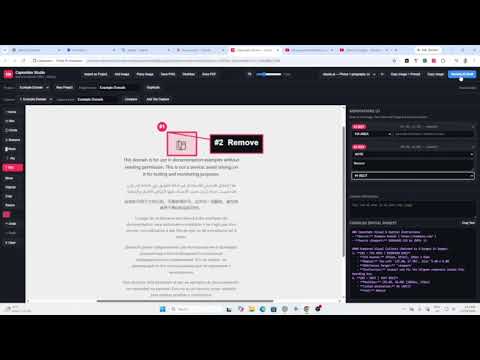
Capnotate — Visual AI Annotator Version 1.3.0 Turn a screenshot into feedback that shows exactly what needs to change. Capnotate helps you capture browser pages, mark up images, and turn your callouts into a prompt you can review and share. • Capture the visible tab, select a region or page element, or capture a full page. You can also import an existing image. • Highlight issues with arrows, boxes, circles, pins, and text. Crop or resize the image, or use a mask to cover sensitive pixels in the rendered output. • Keep related captures in one project. Compare before and after images side by side or with an overlay, and use unresolved callouts in a follow-up prompt. • Review the generated prompt and annotated images, then optionally insert them into an open ChatGPT, Claude, or Gemini chat. Review the destination before inserting because the chat service may upload attachments at that point. You submit the message yourself. • Save PNGs or PDFs, copy an image or prompt to your clipboard, or export a ZIP with annotated images and a Markdown prompt. An editable project backup can include original images and page context. Projects are saved in your Chrome profile. Sharing controls let you omit page URLs, titles, and selectors from generated prompts and choose whether to include selected page text and element labels. Review the final images and prompt before sharing.
0 out of 5No ratings
Details
- Version1.3.0
- UpdatedNovember 18, 2026
- FeaturesOffers in-app purchases
- Offered byartosien22@gmail.com
- Size50.61KiB
- LanguagesEnglish
- Developerangelo enriquez
256 dr pilapil st san miguel Pasig City, Metro Manila 1600 PHEmail
artosien22@gmail.com - Non-traderThis developer has not identified itself as a trader. For consumers in the European Union, please note that consumer rights do not apply to contracts between you and this developer.
Privacy

Capnotate — Visual AI Annotator has disclosed the following information regarding the collection and usage of your data. More detailed information can be found in the developer's privacy policy.
Capnotate — Visual AI Annotator handles the following:
This developer declares that your data is
- Not being sold to third parties, outside of the approved use cases
- Not being used or transferred for purposes that are unrelated to the item's core functionality
- Not being used or transferred to determine creditworthiness or for lending purposes
Support
For help with questions, suggestions, or problems, please open this page on your desktop browser