


Overview
Simulates safe areas for Capacitor apps, including current phones, tablets, and foldables such as iPhone Duo
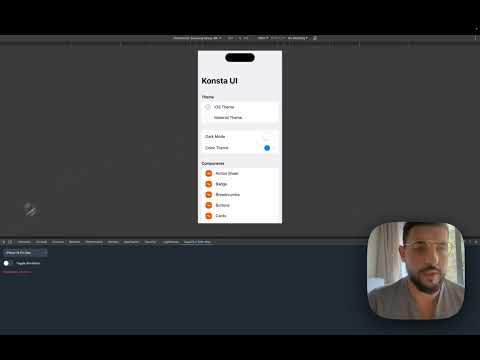
Check Capacitor safe-area layouts in Chrome DevTools without a phone. Open DevTools on the page you are building, select Capacitor Safe Area, pick a device, and turn the simulation on. The insets are applied for Ionic, Konsta UI, and Tailwind Capacitor. WHAT'S NEW IN 1.1.0 The device list now includes current phones, tablets, and foldables. iPhone 18 Pro and iPhone 18 Pro Max are at the top of the iPhone list. iPhone Duo, Galaxy Z Fold etc and Fold each have a cover view and an unfolded view. A search box filters the list. The crease is drawn on its own and is not added to the four edge insets. HOW TO USE 1. Install the extension. 2. Open DevTools on your app. 3. Open the Capacitor Safe Area panel. 4. Pick a device. For a foldable, pick Cover or Unfolded. 5. Turn the simulation on. The simulation does not change the browser's own safe-area values, so a page that only uses those will stay put. PRIVACY The chosen device for the tab you are inspecting stays on this computer. Nothing is sent to a server. The extension does not sell data or use analytics. SUPPORT https://github.com/Cap-go/chrome-ext-for-capacitor/issues support@capgo.app Made for https://capgo.app
5 out of 52 ratings
Details
- Version1.1.0
- UpdatedOctober 26, 2026
- Size31.5KiB
- LanguagesEnglish
- DeveloperDigital Shift OUWebsite
sepapaja 6 Tallinn, Harjumaa 15551 EEEmail
hello@forgr.eePhone
+33 6 51 31 64 27 - TraderThis developer has identified itself as a trader per the definition from the European Union and committed to only offer products or services that comply with EU laws.
- D-U-N-S362993277
Privacy

This developer declares that your data is
- Not being sold to third parties, outside of the approved use cases
- Not being used or transferred for purposes that are unrelated to the item's core functionality
- Not being used or transferred to determine creditworthiness or for lending purposes
Support
For help with questions, suggestions, or problems, please open this page on your desktop browser