

Cap - Screen Recorder & Screen Capture

Overview
Free, open source screen recorder. Capture your screen, tab, camera & mic in Chrome and share a video link the moment you stop.
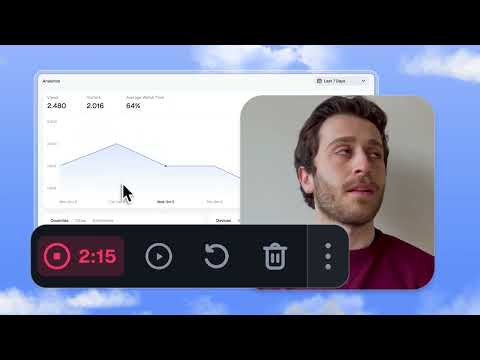
Cap is the open source screen recorder for Chrome. Record your screen, browser tab, window, camera, microphone, and system audio, then share a video link the moment you stop. Cap uploads while you record, so your recording is ready in seconds without a long export step. Built for async work, product demos, bug reports, tutorials, customer support, code reviews, onboarding, sales walkthroughs, design feedback, and quick updates that are easier to show than explain. THE SCREEN RECORDER FOR HOW YOU ACTUALLY WORK Cap makes it simple to capture what you see, explain what you mean, and share it with anyone. Click the Cap icon, choose what you want to record, press start, and keep working. When you stop, your recording is already in your Cap workspace with a shareable link ready to paste anywhere. RECORD AND SHARE IN SECONDS The Chrome extension brings Cap’s Instant Mode directly to your browser. Your video uploads while you record, so there is no waiting around when you finish. Just stop the recording, open the Cap link, and share it with your team, customers, students, clients, or community. WHAT YOU CAN RECORD • Current browser tab • Full screen • Single window • Camera-only video • Microphone audio • System audio where Chrome supports it • Webcam overlay for personal walkthroughs BUILT TO BE YOURS Cap is designed around ownership, transparency, and control. It is fully open source, so you can inspect how it works, contribute to the product, or self-host the platform. Use Cap Cloud, connect your own S3 bucket, or keep your workflow inside infrastructure you control. WHY PEOPLE CHOOSE CAP Open source, end to end Cap is transparent by default. Inspect the code, contribute features, or self-host for complete control over your recording stack. Instant links Cap uploads while you record, so your share link is ready the moment you stop. Paste it into Slack, Linear, GitHub, Notion, email, docs, or wherever your work happens. Your storage, your rules Use Cap Cloud, connect your own S3 bucket, or self-host. Your recordings should belong to you, not be locked inside a closed platform. Async collaboration that actually works Comments, reactions, transcripts, viewer analytics, password-protected shares, custom domains, and team workspaces help turn recordings into useful conversations. Cap AI does the busywork Cap Pro can generate titles, summaries, clickable chapters, and transcripts for your recordings, so the work after recording is already started. A better way to switch from Loom Cap gives you fast screen recording, simple sharing, team collaboration, and a built-in Loom video importer while staying open source and ownership-first. HOW IT WORKS 1. Click the Cap icon in your Chrome toolbar. 2. Choose full screen, window, current tab, or camera-only recording. 3. Select your microphone and camera settings. 4. Press record. 5. Pause, resume, or stop from the floating recording bar. 6. Open the finished Cap link and share it anywhere. MADE FOR EVERYDAY VIDEO Use Cap when a meeting would be too slow, a screenshot would miss the context, or a written message would take too long. • Product demos • Bug reports • Code reviews • Customer support • Team updates • Tutorials • Onboarding • Design feedback • Sales walkthroughs • Process documentation FEATURES • Free screen recording for Chrome • Record tab, screen, window, or camera • Camera and microphone support • Optional webcam overlay • Pause and resume recording • Floating recording controls • Uploads while recording • Instant shareable video links • Browser-based viewing with no downloads required • Comments and reactions on shared videos • AI-generated titles, summaries, chapters, and transcripts on supported plans • Viewer analytics on supported plans • Password-protected sharing on supported plans • Team workspaces on supported plans • Custom domains on supported plans • Custom S3 storage on supported plans • Loom video importer on supported plans • Open source and self-hostable CAP EVERYWHERE The Chrome extension is part of the Cap platform. Record from Chrome when you need speed. Use the native desktop apps for macOS and Windows when you want local recording, Studio Mode, editing, custom backgrounds, exports, and more. Keep everything organized in your Cap workspace. GET STARTED FOR FREE Cap is free to get started. Upgrade to Cap Pro for unlimited cloud features, Cap AI, custom domains, custom S3 storage, team collaboration, and more. Website: https://cap.so Open source on GitHub: https://github.com/CapSoftware/Cap
3.9 out of 57 ratings
Details
- Version1.0.3
- UpdatedJuly 19, 2026
- Size473KiB
- LanguagesEnglish (United States)
- DeveloperCap Software, IncWebsite
1111B S Governors Ave Dover, DE 19904 USEmail
hello@cap.soPhone
+1 740-990-2265 - TraderThis developer has identified itself as a trader per the definition from the European Union and committed to only offer products or services that comply with EU laws.
- D-U-N-S119230849
Privacy

This developer declares that your data is
- Not being sold to third parties, outside of the approved use cases
- Not being used or transferred for purposes that are unrelated to the item's core functionality
- Not being used or transferred to determine creditworthiness or for lending purposes
Support
For help with questions, suggestions, or problems, visit the developer's support site