

Canva Quick Downloader: One-Click Export Button
2 ratings
)
Overview
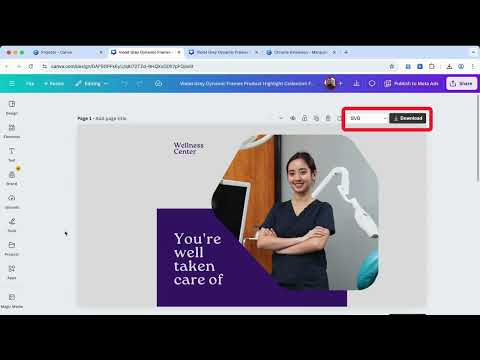
Add a one-click download button to Canva. Instantly export your design in any format Canva supports. No menus, no extra clicks.
Whats New: - we fixed an issue with the page always saving as page 1. Are you tired of the repetitive multi-step process just to download a simple design from Canva? Canva Quick Downloader solves this problem by seamlessly integrating a powerful, one-click export button right where you need it - above every page in the editor. Streamline your design workflow and save hours of clicking and download instantly with a single click every time. It’s the fastest way to get your creations out of Canva and into the world. ✨ Key Features That Speed Up Your Workflow ONE-CLICK EXPORT: A dedicated, fully integrated download button is instantly available on every design page. Ditch the Share menu and export panel for good. AUTO-DETECT PAGES: Our smart system automatically detects new pages added to your design, ensuring the quick download button is always active and ready for every single creation. FULL FORMAT SUPPORT: Download instantly in all major formats, including PNG, JPG, PDF, SVG, and GIF. SEAMLESS INTEGRATION: Zero setup required. The quick download button appears automatically in your Canva editor as a native element. FASTER PERFORMANCE: Built with an optimized script for quicker file preparation and download handling. 🚀 Get Started in Seconds Install Canva Quick Downloader and refresh your Canva tab. Look for the new, dedicated download button immediately above your design. Start exporting faster, smarter, and with fewer clicks today! After 14 days of use, the extension may display a brief feedback prompt asking users to rate or provide feedback on the extension. This happens only once if it is dismissed and does not affect core functionality.
3 out of 52 ratings
Details
- Version1.1
- UpdatedJanuary 13, 2026
- Offered byIDM SOFTWARE PTY LTD
- Size5.62MiB
- LanguagesEnglish
- DeveloperIDM SOFTWARE PTY LTD
470 ST KILDA RD 3864 G Melbourne, VIC 3004 AUEmail
support@idmsoftware.com.auPhone
+61 478 488 305 - TraderThis developer has identified itself as a trader per the definition from the European Union and committed to only offer products or services that comply with EU laws.
Privacy

Canva Quick Downloader: One-Click Export Button has disclosed the following information regarding the collection and usage of your data. More detailed information can be found in the developer's privacy policy.
Canva Quick Downloader: One-Click Export Button handles the following:
This developer declares that your data is
- Not being sold to third parties, outside of the approved use cases
- Not being used or transferred for purposes that are unrelated to the item's core functionality
- Not being used or transferred to determine creditworthiness or for lending purposes