

Canva Automation - Auto Canva Maker
7 个评分
)
概述
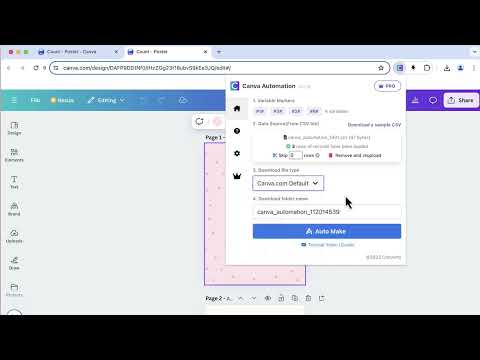
Automate your Canva designs with variables, generate multiple variants in batches, download them automatically at canva.com.
You can batch design in Canva. You can create a generic design on canva.com, then mark the content variables you want to replace, then fill the templated variables with the variables in a CSV-formatted file. It will automatically generate and download automatically one by one. Canva Automation - Auto Canva Maker, is a great automate helper bot for print-on-demand (POD). It is great for designers of Print on Demand (POD) platforms such as merch by amazon, Etsy, Shopify, etc. It's also great for marketers or influencers who need to create a variety of scalable graphics for social media(such as Facebook, Instagram, Pinterest) or marketing purposes. 🆕 New Update v1.2.8 ✓ Fix some issues # Features ✓ Automate Make & Download ✓ Support multi-page design ✓ Multiple variables supported at once ✓ Supports File types: JPG, PNG, PDF, SVG(requires Canva Pro), etc. ✓ Download PNG designs with Transparent background (requires Canva Pro) ✓ Support skipping some csv rows ✓ Sample template CSV file included ✓ Download files to the same directory # FAQ https://canvaautomation.converts.cc#faq If you have any problems, don't hesitate to contact us at convertscc@gmail.com. # Data Privacy All the data you process is on your local computer and never passes through our servers. # Statement CANVA is a trademark of Canva, LLC. Canva Automation - Auto Canva Maker is not affiliated with, endorsed, sponsored, or otherwise related to CANVA, Inc. or any of its affiliates or subsidiaries.
4.3 星(5 星制)7 个评分
详情
- 版本1.2.9
- 上次更新日期2025年3月27日
- 提供方Infzen
- 大小1.33MiB
- 语言English
- 开发者
邮箱
convertscc@gmail.com - 非交易者该开发者尚未将自己标识为交易者。欧盟地区消费者须知:消费者权利可能不适用于您与该开发者达成的合约。
隐私权
“Canva Automation - Auto Canva Maker”已就收集和使用用户数据披露了以下信息。 如需了解详情,请查看开发者的privacy policy。
Canva Automation - Auto Canva Maker会处理以下数据:
该开发者已声明,您的数据:
- 不会因未获批准的用途出售给第三方
- 不会为实现与产品核心功能无关的目的而使用或转移
- 不会为确定信用度或放贷目的而使用或转移
支持
若有任何疑问、建议或问题,请在桌面浏览器中打开此页面