

Cambly Enhancement Suite
4 个评分
)
概述
A set of features to improve the Cambly experience.
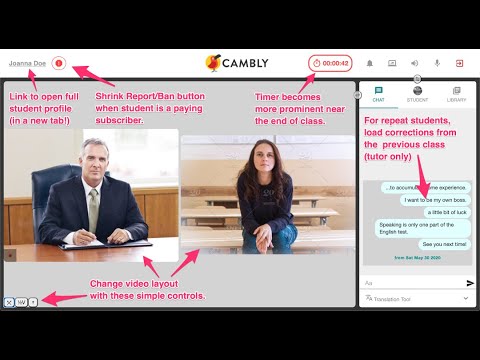
Improves the TUTOR'S experience teaching at Cambly by providing enhancements to the Cambly classroom! Classroom Features: v.1.1.1: - Update extension to work with changes made by Cambly v.1.1.0: * Classroom - Choose your own background color * Classroom - Option to cycle background color * Classroom - Auto-close "Student Preferences" popup * Reservation Page - "Confirm All" button for reservation requests * Reservation Page - Create a weekly schedule for your regulars (BETA) - Update extension to work with changes made by Cambly v.1.0.6: - Update extension to work with changes made by Cambly - Move "Fullscreen" button to between video panel and control panel - Relocate "Reminders" to center of navigation bar v1.0.5: * Show even older message with new "More" link in Chat * Hotkeys for Student Volume Control (Ctrl+Shift+Up, Ctrl+Shift+Down) - Fix "Video Swap" for Cambly Kids classrooms - Fix Student Name link uses new Cambly profile urls v1.0.4: (***Enable from options page) *** "Reminders": Display customizable reminders in NavBar * Add "Useful Links" section to Options Page * Add "Options Page" button to classroom * Simplify feature descriptions on options page - Fix "Previous Lesson Chat" issue - Fix "Old Exit Button" appearing as empty button - Fix "Incoming Call Alert" getting stuck with background red - Fix "Video Layout" when class begins with lesson content open v1.0.3: (***Enable from options page) *** Full volume control (replaces "Mute" button) *** Go back to old-style, smaller "Exit Class" button * Improve compatibility with new Cambly Speed Dial button. * Improve compatibility with Cambly alternative video service provider v1.0.2: - Flash classroom background upon new incoming call *** Warmup Screen - automatically check checkboxes - Fullscreen button - toggle between fullscreen and windowed mode - Options Page (chrome-extension://cjafgfpjmkofakmllcbggmphkpcdippo/options.html) v1.0.1: - Customize Layout - change classroom layout to fit your teaching setup and your eye-line to the camera. *** End of Class Alert - timer lights up to warn the tutor as the class comes to an end. - Show Prior Corrections - when teaching repeat students, display corrections from previous class with that student; use this to remember who the student is and review what you taught them in the last lesson. - Quick Links (open in new tab): - Student Name - links to full student profile - Student Language - links to Google Translate page for student's language - Student Location - links to Google Maps for student's country - Smaller "Report/Ban" button when teaching students with paid accounts. Note: This extension is NOT created by Cambly and is NOT for students. It is intended to improve the tutor teaching experience only. Thank you! :) Problems? - You can quickly disable the entire extension by Right-Clicking on the Bird icon in your Chrome Toolbar. - You can disable individual features from the options page - This extension will never cause connection or video problems. If you experience connection or video problems, please check the normal Cambly status page or contact Cambly Tech Support. - If you experience classroom layout or visual elements errors, you can make sure it is not caused by this extension by disabling it (Right-Click on the Bird icon in your Chrome Toolbar) and reloading the classroom.
5 星(5 星制)4 个评分
详情
- 版本1.1.1
- 上次更新日期2021年8月7日
- 提供方Browser Sanity
- 大小182KiB
- 语言English
- 开发者
邮箱
browsersanity@gmail.com - 非交易者该开发者尚未将自己标识为交易者。欧盟地区消费者须知:消费者权利可能不适用于您与该开发者达成的合约。
隐私权

该开发者已声明,您的数据:
- 不会因未获批准的用途出售给第三方
- 不会为实现与产品核心功能无关的目的而使用或转移
- 不会为确定信用度或放贷目的而使用或转移
支持
若有任何疑问、建议或问题,请在桌面浏览器中打开此页面