


Overview
@calycode we believe that developer tools should empower teams with clarity, transparency, and control.
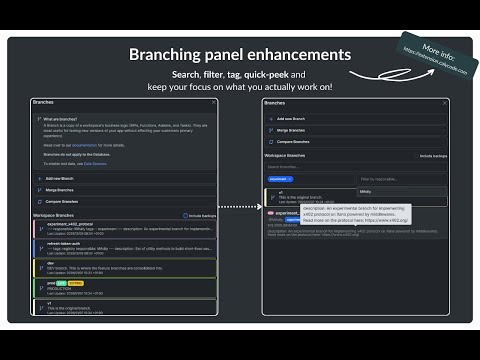
@calycode | Extension is designed specifically for Xano developers. For full and latest documentation visit: https://extension.calycode.com or for more videos about the extension see our official YouTube Playlist: https://links.calycode.com/extension-yt-playlist Key Features 1. @CalyAgent An AI assistant sidebar that brings the power of established coding harness right into Xano. This assistant can let you work on multiple sessions simulatniously, and verify the agent output instantly, without context or tool switching. 2. Branching Enhancer: Transform your workspace branch list from a simple list into a manageable, searchable collection. Search by name, tags and responsible developers, see the full branch description on hover, for quick overview. We treat your branch descriptions as a source of truth. By using a simple Frontmatter syntax, you can unlock advanced filtering see example: ```markdown --- tags: - feature - migrations - sprint-12 responsible: Mihály order: 1 --- description: Implementing the x402 protocol. ``` --- 3. Debugger improvements: Set custom HTTP request headers directly in the Xano Debugger Panel to test your custom headers without publishing your API. Preview HTML rendered output of the endpoints after running debugger. --- 4. Integration with the Xano Metadata API Securely provide your Xano Metadata API key through the extension settings to unlock: - Custom domains: Enable the extension to work on your custom domains for Xano. - Registry Access: Install items (xanoscript) directly from the caly-registry. - Advanced Orchestration: Automate repetitive workspace tasks. --- 5. Getting Started 5.1. Install the Extension from the [Chrome Web Store](https://chromewebstore.google.com/detail/hadkkdmpcmllbkfopioopcmeapjchpbm). 5.2. Open Xano and navigate to any workspace through the default `<unique-id>.xano.io` domain. 5.3. Enjoy or configure further via the built in settings. --- 6. Support & Contribution @calycode | Extension is part of the @calycode ecosystem. For issues, feature requests, or documentation on the Metadata API integration, visit our main portal: https://calycode.com or our GitHub page: https://github.com/calycode
5 out of 53 ratings
Details
- Version0.9.0
- UpdatedMay 21, 2026
- Size750KiB
- LanguagesEnglish
- DeveloperWebsite
Email
hello@calycode.com - Non-traderThis developer has not identified itself as a trader. For consumers in the European Union, please note that consumer rights do not apply to contracts between you and this developer.
Privacy

@calycode | Extension has disclosed the following information regarding the collection and usage of your data. More detailed information can be found in the developer's privacy policy.
@calycode | Extension handles the following:
This developer declares that your data is
- Not being sold to third parties, outside of the approved use cases
- Not being used or transferred for purposes that are unrelated to the item's core functionality
- Not being used or transferred to determine creditworthiness or for lending purposes
Support
For help with questions, suggestions, or problems, please open this page on your desktop browser