


Overview
Calvin chrome extension intelligently organizes your tabs across all of your devices
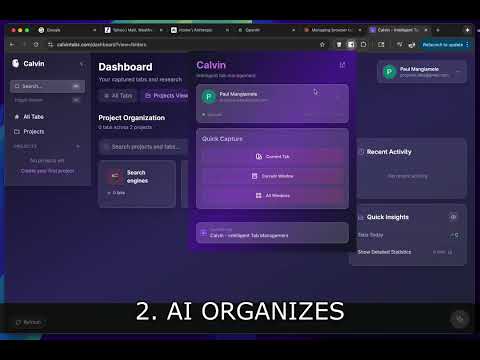
Calvin saves your browser tabs and uses AI to organize them into project folders on a web UI automatically - that can be pulled back up in a group or searched easily. Capture tabs with one click. Calvin analyzes the page content and suggests the right folder—a React tutorial goes to "Web Development," vacation research goes to "Travel Planning." You review and accept. When you need to find something later, search across all your saved tabs instantly. Restore entire projects as tab groups with one click. Stop losing important tabs. Stop wasting time searching for pages you've already visited. Free to use. Create an account at calvintabs.com to get started.
0 out of 5No ratings
Details
- Version1.1.3
- UpdatedMarch 10, 2026
- Size258KiB
- LanguagesEnglish
- DeveloperWebsite
Email
proprius.labs@gmail.com - Non-traderThis developer has not identified itself as a trader. For consumers in the European Union, please note that consumer rights do not apply to contracts between you and this developer.
Privacy

Calvin: Cross-platform AI Tab Manager has disclosed the following information regarding the collection and usage of your data. More detailed information can be found in the developer's privacy policy.
Calvin: Cross-platform AI Tab Manager handles the following:
This developer declares that your data is
- Not being sold to third parties, outside of the approved use cases
- Not being used or transferred for purposes that are unrelated to the item's core functionality
- Not being used or transferred to determine creditworthiness or for lending purposes
Support
For help with questions, suggestions, or problems, please open this page on your desktop browser