

Call Recorder for Google Meet
1 rating
)
Overview
Record Google Meet and browser calls with audio. Save locally as MP4 or WebM. Free, no account, no bot, no uploads.
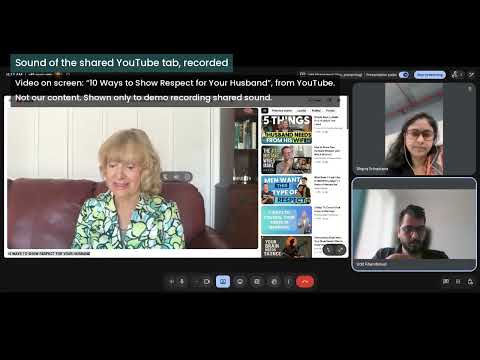
Capture your call tab, the other participants’ voices and your microphone in one file on your computer. Call Recorder is a free Google Meet recorder that also works with other video calls in Chrome tabs. No account. No recording time limit. No bot joins the meeting. Recordings stay on your computer, with no uploads, server or analytics. RECORD VIDEO AND BOTH SIDES OF THE CONVERSATION • Save the call tab’s video, call audio and your voice together as an MP4 or WebM file. • Reduce background noise from your microphone with a small model that runs locally. • Check live audio meters to see whether your microphone and the call are being captured. • Get a warning if the finished recording is silent. SAVE DIRECTLY TO YOUR COMPUTER • Save to Downloads or a folder you choose. • Keep recording after you close the extension popup. • Write the file to disk as you record, rather than keeping the whole recording in memory. • Keep files smaller with video capped at 720p and 15 frames per second. FIND YOUR RECORDINGS LATER The library lists each recording’s date and time, duration, file size and tab title. If Chrome closes unexpectedly, open the library to find and save any recoverable recording. CAPTURE SHARED AUDIO On Google Meet and Konvene, audio from a screen or tab you share in the call is included while you share it. MAKE RECORDING VISIBLE On Konvene, everyone in the call sees a badge with your name while you record. For Google Meet and other browser calls, the extension asks you to confirm that you have told everyone before recording starts. PRIVACY AND OPEN SOURCE Capture begins only after you press Start. Your call tab and microphone are recorded to a file on your own computer. Nothing is uploaded. Call Recorder is open source under the AGPL-3.0 license. Read the full policy using the privacy policy link on this page. Please record responsibly and obtain any consent required before recording. Call Recorder is not affiliated with or endorsed by Google or any other call service named here.
5 out of 51 rating
Details
- Version0.1.0
- UpdatedNovember 3, 2026
- Offered byuditk2@gmail.com
- Size432KiB
- LanguagesEnglish
- Developer
Email
uditk2@gmail.com - Non-traderThis developer has not identified itself as a trader. For consumers in the European Union, please note that consumer rights do not apply to contracts between you and this developer.
Privacy

This developer declares that your data is
- Not being sold to third parties, outside of the approved use cases
- Not being used or transferred for purposes that are unrelated to the item's core functionality
- Not being used or transferred to determine creditworthiness or for lending purposes
Support
For help with questions, suggestions, or problems, visit the developer's support site