

CalendarKit

Overview
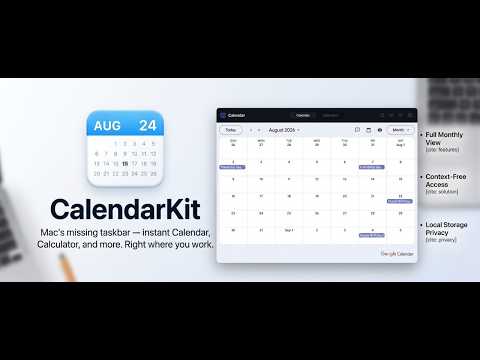
Instant access to Google Calendar and essential utilities — all in one place, right from your toolbar.
Tired of juggling multiple tabs and desktop apps just to check your schedule, do quick math, or search through dense webpages? CalendarKit is your all-in-one in-browser productivity toolkit. Originally built to bring the seamless taskbar calendar experience to your browser, CalendarKit now packs four essential daily workflow tools into a single, lightning-fast, privacy-first Chrome extension. No context switching. No heavy desktop apps. Everything opens in one click. --- ### 🚀 What’s Inside CalendarKit: 📅 1. Instant Google Calendar • Access your full Google Calendar directly from the toolbar popup. • Quickly view your schedule, browse upcoming events, and navigate across any month. • Stay focused on your work without leaving your active tab. 🧮 2. Built-in Calculator with History • Perform quick calculations instantly without opening a separate desktop app. • Persistent calculation history ensures your previous numbers are never lost when switching tabs. 🔍 3. Multi Finder (Multi-Term In-Page Search) Supercharge your search and replace standard single-word Ctrl+F: • Simultaneous 5-Color Search: Highlight up to 5 different terms at once with distinct pastel colors. • Smart Selection Auto-Fill: Select text anywhere on a webpage and hit your shortcut (Cmd+Shift+F / Ctrl+Shift+F) to instantly populate and search terms sequentially. • Custom Shortcut Recorder: Set your own hotkeys or easily map it to replace native Ctrl+F / Cmd+F without conflicts. • Per-Term Controls: Independent Match Case (Aa) and Whole Word (W) toggles with match counters (e.g., 1/12). • Draggable & Minimizable: Move the floating search bar anywhere, double-click to reset, or collapse it into a sleek mini pill. • Shadow DOM Isolation: Zero UI bugs—isolated styles ensure no webpage CSS can distort the interface. 📸 4. Text Grabber (100% Offline Screen OCR) Extract and copy text that was previously uncopyable: • Drag-to-Select: Click "Select Screen Area" and draw a box over any image, video frame, chart, or locked document. • Copy Uncopyable Text: Easily grab text from YouTube video frames, slides, PDFs, and sites with disabled right-click. • Built-in Editor & Counters: Extracted text appears in an instant editor with real-time character and word counts. • 1-Click Copy: Edit on the fly and copy straight to your clipboard with a single tap. --- ### ⚡ Why You'll Love CalendarKit: ✅ 4-in-1 Productivity Suite (Calendar, Calculator, Multi Finder, Screen OCR) ✅ Dark glassmorphism theme with a clean, minimal interface ✅ Customizable default tab & customizable keyboard hotkeys ✅ Lightweight & ultra-fast — zero browser lag or memory bloat ✅ 100% Private & Offline — Text Grabber runs locally via WebAssembly; search terms are purged upon exit ✅ Zero telemetry, zero cloud tracking, no accounts, and no sign-ups required --- Keep your workflow fast, organized, and distraction-free. Add CalendarKit to Chrome today!
0 out of 5No ratings
Details
- Version1.2.0
- UpdatedSeptember 13, 2026
- Offered bySarvesh
- Size12.2MiB
- LanguagesEnglish
- Developer
Email
sarveshk069@gmail.com - Non-traderThis developer has not identified itself as a trader. For consumers in the European Union, please note that consumer rights do not apply to contracts between you and this developer.
Privacy

This developer declares that your data is
- Not being sold to third parties, outside of the approved use cases
- Not being used or transferred for purposes that are unrelated to the item's core functionality
- Not being used or transferred to determine creditworthiness or for lending purposes
Support
For help with questions, suggestions, or problems, please open this page on your desktop browser