


Overview
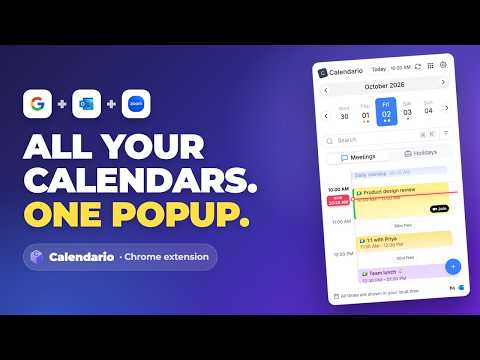
Google, Outlook & Zoom meetings in one place. See your next meeting, create events, and join calls from your browser toolbar.
Calendario — Google, Outlook & Zoom calendars in one fast popup Stop switching tabs to check your schedule. Calendario merges your Google Calendar, Outlook / Microsoft 365 calendar and Zoom meetings into one fast popup (or side panel) in your browser. See your day on a live timeline, join a call, create events and get reminded on whatever page you're on, without opening any calendar app. ━━━━━━━━━━━━━━━━━━━━ 🔗 ALL YOUR CALENDARS, TOGETHER ━━━━━━━━━━━━━━━━━━━━ • Connect Google Calendar, Outlook / Microsoft 365 and Zoom. Use one, two or all three at the same time. • Every event from every account is merged into one chronologically sorted view, each marked with its provider icon. • Turn individual calendars on or off per account (a shared "Family" or "Team" calendar, not just your primary one). • "Last synced" status and a one-tap "Sync Now" on every account, plus automatic background refresh so new invites and edits show up on their own. • Sign in or out of any provider independently, any time, from Settings. ━━━━━━━━━━━━━━━━━━━━ 🕐 TIMELINE VIEW: YOUR DAY, HOUR BY HOUR ━━━━━━━━━━━━━━━━━━━━ • See meetings laid out where they actually sit in your day, with a live red "Now" line showing the current time. • Overlapping meetings sit side by side instead of hiding behind each other. • Scrolled away? A "Jump to now" pill takes you straight back. • Colour-coded event cards with provider icons, in light and dark mode. • Prefer a simple list? Switch Timeline view off in Settings for a clean agenda with "Starts in 23m" badges, progress on live meetings and a one-tap Join button. ━━━━━━━━━━━━━━━━━━━━ 📅 JUMP TO ANY DATE ━━━━━━━━━━━━━━━━━━━━ • A week strip at the top with coloured dots showing which days have events. • A month picker with a Today shortcut and previous / next arrows. • Switch between Meetings and Holidays, and see national holidays right alongside your events. ━━━━━━━━━━━━━━━━━━━━ 🔍 RICH EVENT DETAILS ━━━━━━━━━━━━━━━━━━━━ Tap any event to expand it in place, without losing your spot in the day: • Calendar and account, start and end time, reminder lead time and organizer. • Description, date, duration and location, with a map-friendly display. • One-tap Join for video calls. Google Meet, Microsoft Teams and Zoom links are detected automatically. • The full attendee list with each person's response (accepted / declined / tentative / no reply). • File attachments, downloadable directly. • "Expand multiple events" (optional) keeps several cards open at once. ━━━━━━━━━━━━━━━━━━━━ ✅ RESPOND AND MANAGE WITHOUT LEAVING THE POPUP ━━━━━━━━━━━━━━━━━━━━ • Accept, decline or mark yourself tentative on any invite. It syncs straight back to Google or Outlook. • Copy an event's shareable link in one click. • Open the event in Google Calendar or Outlook on the web if you need to edit it there. • Delete an event, choosing between a single occurrence or a whole recurring series. ━━━━━━━━━━━━━━━━━━━━ ➕ CREATE EVENTS AND TASKS ━━━━━━━━━━━━━━━━━━━━ • Tap + for a full event composer, with Event and Task tabs. • Drag across the timeline to pick a time range. A dashed selection with handles and live start, end and duration labels shows exactly what you're booking. • Choose which calendar and account the event goes into. • Location field with place suggestions from Google Places and a map shortcut. • All-day toggle, start and end date and time, and any time zone (search by city, zone name or GMT offset). • Conflict warning: "Overlaps with other events" lists exactly what clashes, with a "Find a time" shortcut and a day preview so you never double-book. • Repeat daily, weekly, monthly, yearly or every weekday, or build a custom recurrence with an end date or occurrence count. • Add a Google Meet or Microsoft Teams link with one toggle. • Invite guests by name or email and mark guests optional. • Add attachments and write a rich description (bold, italic, underline, lists and links). • Custom reminders, so you decide how far ahead each one fires. ━━━━━━━━━━━━━━━━━━━━ ⌘K SEARCH AND FILTERS ━━━━━━━━━━━━━━━━━━━━ • Press ⌘K (Ctrl+K) and search every connected calendar at once. • Quick filters: Today, Tomorrow, This week, Next week, Meetings and Attachments. • Suggestions drawn from your own events, with provider icons. • Type naturally, like "meetings tomorrow evening", and Calendario turns it into filters. • Stack filters as removable chips (date range, time of day, duration, people, status and more), with a badge counting the active filters. • A summary shows how many accounts and calendars were searched and how many events matched, with results grouped by day. • Keyboard-first: arrow keys to navigate, Enter to select, Esc to close. ━━━━━━━━━━━━━━━━━━━━ 🔔 REMINDERS THAT ACTUALLY REACH YOU ━━━━━━━━━━━━━━━━━━━━ • When a reminder is due, a popup and a chime appear on the page you're on, with a one-click "Open event" button. • Turn reminders on or off, and set them to auto-close after a set time or never. • The toolbar icon shows the start time of your next event today, or "NOW" the moment a meeting begins. Glance at your browser bar instead of opening anything. • The toolbar badge updates through the day and follows your 12-hour or 24-hour setting. ━━━━━━━━━━━━━━━━━━━━ 🪟 POPUP, SIDE PANEL OR FLOATING LAUNCHER ━━━━━━━━━━━━━━━━━━━━ • Choose whether the toolbar icon opens a popup or a side panel that stays open next to the page you're working on. • An optional floating launcher icon on web pages opens Calendario in one click. You can drag it where you like and exclude any websites. ━━━━━━━━━━━━━━━━━━━━ 🎨 MAKE IT YOURS ━━━━━━━━━━━━━━━━━━━━ • System, Light or Dark theme with 7 accent colours. • Timeline view toggle with a live animated preview. • 12-hour or 24-hour time, with an optional live clock next to Today. • Available in 15 languages: English, Hindi, Spanish, French, German, Portuguese, Italian, Turkish, Tamil, Telugu, Bengali, Japanese, Korean, Simplified Chinese and Arabic. ━━━━━━━━━━━━━━━━━━━━ 🔒 BUILT WITH YOUR PRIVACY IN MIND ━━━━━━━━━━━━━━━━━━━━ • Calendario talks directly to Google's, Microsoft's and Zoom's own APIs. There is no third-party server in between reading your calendar. • Sign in or out of any provider independently, any time, from Settings. ━━━━━━━━━━━━━━━━━━━━ ℹ️ WHY CALENDARIO ASKS FOR THESE PERMISSIONS ━━━━━━━━━━━━━━━━━━━━ • Sign-in and calendar access: to read and update your events with Google, Microsoft and Zoom. Only the accounts you connect are used. • Access to web pages: only to show the in-page reminder popup and the optional floating launcher. Calendario does not read or collect the content of the pages you visit. • Notifications and alarms: to deliver reminders on time and update the toolbar badge. Whether you're juggling a personal Gmail calendar, a work Outlook calendar, Zoom meetings, or all of them, Calendario keeps you on schedule without the tab-switching.
5 out of 53 ratings
Details
- Version1.0.23
- UpdatedOctober 15, 2026
- Size1.44MiB
- Languages15 languages
- DeveloperGaurav SutharWebsite
Gaurav Suthar, opp. to Shri Abhay Nobles School Ganpati Colony Takhatgarh, Rajasthan 306912 INEmail
gaurav.suthar161@gmail.com - Non-traderThis developer has not identified itself as a trader. For consumers in the European Union, please note that consumer rights do not apply to contracts between you and this developer.
Privacy

This developer declares that your data is
- Not being sold to third parties, outside of the approved use cases
- Not being used or transferred for purposes that are unrelated to the item's core functionality
- Not being used or transferred to determine creditworthiness or for lending purposes
Support
For help with questions, suggestions, or problems, please open this page on your desktop browser