

Calendar Paint – Colors & Rules for Google Calendar

Overview
Automatic colors and rules for Google Calendar. Recurring events stay colored. No sign-in, private and fast.
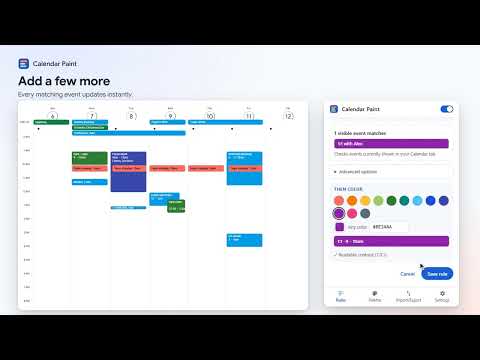
Color Google Calendar automatically. Create simple rules once, and every matching event stays organized. Calendar Paint adds the color controls Google Calendar is missing. Write a rule like "title contains Gym → green" and every gym session turns green, in every view, as you navigate. INSTALL AND IT WORKS • No Google sign-in or OAuth, no signup, no server. • Already-open Calendar tabs start coloring right away. No reload needed. RECURRING MEANS RECURRING • Create the rule once. Every matching occurrence stays colored, including ones months from now. • Coloring a repeating event by hand colors the whole series by default. You can still pick "Only this event". AUTOMATIC RULES • Match event titles with: contains, does not contain, is exactly, starts with, ends with, or a regular expression. • Rules run top to bottom and the first match wins. Reorder, pause or edit them any time. • Optional filters for all-day or timed events, and for recurring or one-off events. • A live preview shows how many events in your open calendar match before you save. WHY IS THIS EVENT BLUE? • Open any event to see which rule colored it, and why. • Jump straight to that rule, or keep Google's color for just that event. • Rule health: see how many visible events each rule colors, when a higher rule wins an event, and which rules haven't colored anything in 90 days of use. CUSTOM COLORS • Build your own palette with any color, and name your colors. • Color a single event by hand from its details. A manual color always beats rules. • Pick a default color for everything no rule matches, or keep Google's colors. FULL COLOR BLOCKS, READABLE TEXT • Events become clear solid color blocks, not tiny dots, in Day, Week, Month and Schedule views. • Text switches to black or white automatically for the best contrast. • Picking your own text color? A contrast check shows right away, with a one-click fix. • No flash of Google's colors: events are colored in the same frame they appear, even when you switch weeks or months. • Past events stay softly faded, like in Google Calendar. PRIVATE AND LIGHTWEIGHT • Everything runs in your browser. Event titles never leave your device. • No analytics, no ads. • Minimal permissions: storage for your rules, access to calendar.google.com to color events, and scripting to start in already-open Calendar tabs after install or update. • Rules and palette sync through your own Chrome profile. ALSO • Turn everything off with one switch. Google Calendar's own look comes back instantly. • Export and import your settings as a file. • Light and dark mode. Calendar Paint changes how events look in your browser only. It never edits your events or your Google account, and other people still see Google's colors. Chrome extensions do not run in the Google Calendar mobile apps. COMING LATER • Your colors on your phone: an optional sign-in that writes your colors into Google Calendar itself, so the mobile apps show them too. Calendar Paint is an independent extension. It is not affiliated with or endorsed by Google. Google Calendar is a trademark of Google LLC.
0 out of 5No ratings
Details
- Version1.0.0
- UpdatedSeptember 22, 2026
- Offered bysupport
- Size84.6KiB
- LanguagesEnglish
- Developer
Email
support@enuf.ai - Non-traderThis developer has not identified itself as a trader. For consumers in the European Union, please note that consumer rights do not apply to contracts between you and this developer.
Privacy

Calendar Paint – Colors & Rules for Google Calendar has disclosed the following information regarding the collection and usage of your data. More detailed information can be found in the developer's privacy policy.
Calendar Paint – Colors & Rules for Google Calendar handles the following:
This developer declares that your data is
- Not being sold to third parties, outside of the approved use cases
- Not being used or transferred for purposes that are unrelated to the item's core functionality
- Not being used or transferred to determine creditworthiness or for lending purposes
Support
For help with questions, suggestions, or problems, visit the developer's support site