Overview
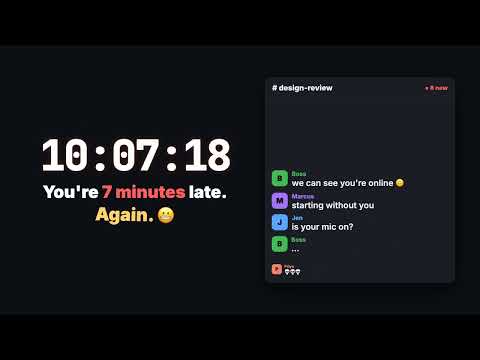
Make Google Calendar reminders harder to miss with high-visibility notifications and an optional alarm window.
# Chrome Web Store listing ## Product details - Name: Calendar Alarm - Summary: Make Google Calendar reminders harder to miss with high-visibility notifications and an optional alarm window. (Must match the manifest description, 132 characters max.) - Category: Productivity - Language: English (United States) ## Detailed description Never miss a meeting again. Calendar Alarm turns Google Calendar's easy-to-miss reminders into a full-screen, focused alarm you can't ignore. No Google login. No API keys. No servers. Calendar Alarm never asks for your Google credentials. It listens for the reminders Google Calendar already shows in your browser and amplifies them. Features: - Full-screen alarm window that takes focus and chimes until you respond - Keyboard shortcuts: Enter jumps to your Calendar tab, Esc closes the alarm - Snooze for 30 seconds, 1 minute, 90 seconds, or 2 minutes - Keeps a pinned Google Calendar tab open and awake so reminders can fire, even if you close Calendar or Chrome's Memory Saver kicks in - Setup checklist in the toolbar popup that checks your Calendar tab and notification permission - A persistent Chrome notification, in addition to the alarm window - A terminal / Matrix look, built for developers - No analytics, ads, account, subscription, or external server - Open source (MIT): https://github.com/djedi/gcal-meeting-alerter Best setup: in Google Calendar, open Settings → Notification settings and choose "Desktop notifications". Allow notifications for calendar.google.com in Chrome. Important limitation: Calendar Alarm amplifies reminders that Google Calendar shows in an open Calendar tab. It does not access the Google Calendar API, read your calendar on its own, or create its own reminder schedule. It keeps a Calendar tab open for you by default, but Chrome itself must be running. Privacy by design: reminder text is processed and stored locally in Chrome, only as needed to show the latest alert or a pending snooze. It is never sent to the developer or third parties. Built by Dustin Davis. Feature ideas and questions are welcome on X: @DustinDavis (https://x.com/DustinDavis). Google Calendar is a trademark of Google LLC. Calendar Alarm is an independent extension and is not affiliated with or endorsed by Google. ## Single purpose Detect supported reminder signals displayed by Google Calendar and amplify them with persistent local notifications, an optional focused alarm window, and user-requested short snoozes. ## Permission justifications - alarms: Schedules the four user-selected snooze durations as durable one-shot Chrome alarms, plus a once-a-minute check that a Google Calendar tab is open so reminders can fire. - notifications: Creates persistent local reminder notifications and clears them when the reminder is handled. - storage: Saves the four user preferences, local diagnostic timestamps, the Calendar notification-permission state, the ID of the Calendar tab the extension opened, the most recent alert text, and pending snooze payloads. - Host access to https://calendar.google.com/*: Runs the reminder detector only on Google Calendar so the extension can recognize reminder dialogs and page-created reminder notifications. It is also used to find existing Calendar tabs so the extension can focus one, keep it from being discarded, or open one when "keep Calendar open" is enabled. No other sites are accessed. The extension does not request the tabs permission. Access to Calendar tab URLs comes from the calendar.google.com host permission alone. ## Privacy practices dashboard Data handled: - Website content: Calendar Alarm locally examines page-created alert and notification text (including notifications shown through the page's service worker registration) plus reminder-dialog content on calendar.google.com. Unrelated alert/dialog text is discarded immediately. Every page-created Web Notification on Calendar is treated as a reminder signal because its title may contain only an event name; qualifying text can include an event title and time. Data handling declarations: - Used only for the extension's single purpose. - Not sold to third parties. - Not used or transferred for purposes unrelated to the single purpose. - Not used or transferred for creditworthiness or lending. - Reminder text is not transmitted off the user's device by Calendar Alarm. - Preference settings may be synced by Chrome when the user enables Chrome Sync. - Certify compliance with the Chrome Web Store User Data Policy's Limited Use requirements. ## Store artwork - Screenshots (1280×800): store-assets/screenshot-alarm-1280x800.png, store-assets/screenshot-popup-1280x800.png, store-assets/screenshot-settings-1280x800.png - Small promo tile: store-assets/small-promo-440x280.png - Store icon: icons/icon-128.png ## URLs - Homepage: https://github.com/djedi/gcal-meeting-alerter - Support: https://github.com/djedi/gcal-meeting-alerter/blob/main/SUPPORT.md - Privacy policy: https://github.com/djedi/gcal-meeting-alerter/blob/main/PRIVACY.md ## Support copy Calendar Alarm amplifies reminders shown by an open Google Calendar tab. If an alert does not appear, run the extension's test alarm first, then verify Calendar event notifications, Chrome site notification permission for calendar.google.com, operating-system Chrome notifications, and that a Calendar tab remains open.
0 out of 5No ratings
Details
- Version2.3.0
- UpdatedSeptember 26, 2026
- Size50.66KiB
- LanguagesEnglish
- DeveloperWebsite
Email
dustin@redseam.com - Non-traderThis developer has not identified itself as a trader. For consumers in the European Union, please note that consumer rights do not apply to contracts between you and this developer.
Privacy

This developer declares that your data is
- Not being sold to third parties, outside of the approved use cases
- Not being used or transferred for purposes that are unrelated to the item's core functionality
- Not being used or transferred to determine creditworthiness or for lending purposes
Support
For help with questions, suggestions, or problems, visit the developer's support site