

Calc
114 個評分
)
總覽
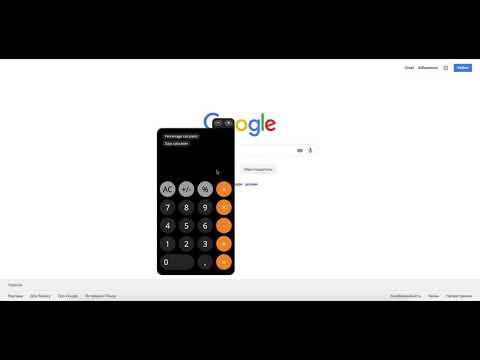
Calc is a simple online calculator that saves your time. You can use Calc right in your browser without opening any additional tabs.
Calc is a simple online calculator that saves your time. You can use Calc right in your browser without opening any additional tabs. Calc is a good online calculator for work, home or study. Simply for every calculation. Count wherever. [Important!] Access to site data is necessary to open the calculator in content or window mode, and to autorun Calc at sites you specify (the list of specified sites could be set in the settings). Calc does not collect your data and does not transmit it. There are several reasons to download and install Calc: 1. Basic calculator. Simple and clear calculator for ordinary calculations. 2. Handy percent calculator. You can find out how many percent is the number X of number Y. Which number corresponds to X percent of the number Y. Add or subtract the percentages from the number. 3. Days calculator. With our day calculator you will be able to calculate the period of time with an accuracy of one second. Calc extension uses Google Analytics service to collect statistics on extension usage. If you do not want to transfer data, install the official blocker application from Google or any of its analogues. The official blocker of Google Analytics from Google is http://tools.google.com/dlpage/gaoptout. We support Chrome Online Store policy on minimal rational use of permissions: 1. Cookies - Auto-detection of language and country. 2. Notifications - Timer Alarms. 3. Storage - Auto saving extension settings. - Calc's history. 4. WebNavigation - auto-start calculator on the set sites (you can select websites list in the settings) 5. ContextMenus - Open the calculator in content or window mode. 6. Tabs - Open Calc in a new tab.
4.6 分 (滿分 5 分)114 個評分
詳細資料
- 版本1.0.14
- 已更新2021年7月28日
- 提供者Calc
- 大小423KiB
- 語言5 種語言
- 開發人員
電子郵件
andrew.efimenko@hotmail.com - 非交易商這位開發人員並未表明自己是交易商。歐盟地區的消費者請注意,消費者權利不適用於你和這位開發人員之間簽訂的合約。
隱私權

這位開發者就你的資料做出下列聲明:
- 除經核准的用途外,不會將你的資料販售給第三方
- 不會基於與商品核心功能無關的目的,使用或轉移資料
- 不會為了確認信用度或基於貸款目的,使用或轉移資料
支援
如有疑問或建議,請使用電腦版瀏覽器開啟這個頁面