

SubPIP: Picture-in-Picture with Subtitles

Overview
Picture-in-Picture that keeps the subtitles. Style the captions, translate them, and follow a video while you work in another tab.
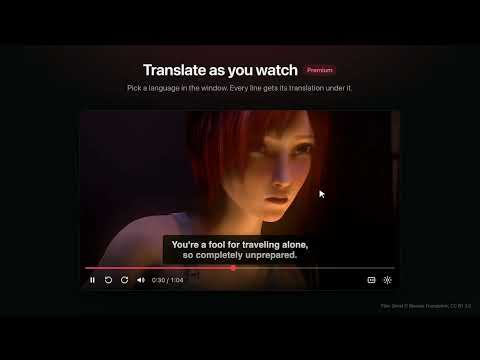
Watch a video in a floating window and keep its subtitles. Chrome's own Picture-in-Picture drops the captions. SubPIP opens the video in a floating window that keeps them, with real controls: play, seek, volume and a captions switch. Keep working in another tab and still follow every line. HOW TO USE 1. Play a video with its captions turned on. 2. Press Alt+P, or click the SubPIP icon and choose Open Picture-in-Picture. 3. The video opens in a floating window with its subtitles. WHERE IT WORKS • YouTube, Netflix, JioHotstar and Crunchyroll, with caption support built in. • Most other sites, using the video's own captions. If SubPIP cannot find a site's captions, point at them once and it remembers. • Chrome, Edge and Brave on a computer. FREE • Subtitles in Picture-in-Picture • Caption styles: Classic, Large or Outline, or your own size, colours and background • Play, seek, volume and captions on or off, in the window • Keyboard shortcuts: Space, arrows, M to mute, C for captions • Auto PiP (optional, Chrome 134 or newer): the video pops out when you switch tabs PREMIUM (one payment, no subscription) • Translation while you watch, into 39 languages, with the original line above it • Captions written from speech, for videos that have none (Chrome 139 or newer) • Study tools: click a word for its meaning, replay a line, save lines for later • Your own subtitles, from a file or a link • Playback speed from 0.5× to 3× • Skip intro and Next buttons in the window Premium is ₹999 in India and $15 elsewhere, with a full refund within 7 days. Details: https://subpip.online/#pricing PRIVACY The extension has no ads and does not collect your browsing history. It sends anonymous usage counts (how often the window is opened and whether captions were found, with no name and no page address), which you can switch off in the popup. Your settings stay in your browser. Caption text leaves your browser only when you turn translation on, and not at all where Chrome can translate on your device. Full policy: https://subpip.online/privacy.html HELP Something not working on a site? Write to tarunmonga2208@gmail.com with the site's name. The film in the screenshots is Sintel, © Blender Foundation, used under CC BY 3.0.
3.6 out of 516 ratings
Details
- Version5.0.0
- UpdatedOctober 21, 2026
- FeaturesOffers in-app purchases
- Size75.3KiB
- Languages8 languages
- DeveloperWebsite
Email
tarunmonga2208@gmail.com - Non-traderThis developer has not identified itself as a trader. For consumers in the European Union, please note that consumer rights do not apply to contracts between you and this developer.
Privacy

SubPIP: Picture-in-Picture with Subtitles has disclosed the following information regarding the collection and usage of your data. More detailed information can be found in the developer's privacy policy.
SubPIP: Picture-in-Picture with Subtitles handles the following:
This developer declares that your data is
- Not being sold to third parties, outside of the approved use cases
- Not being used or transferred for purposes that are unrelated to the item's core functionality
- Not being used or transferred to determine creditworthiness or for lending purposes