

Cadence: Batch Studio for Google Flow
2 ratings
)
Overview
Queue hundreds of prompts into Google Flow, save every result in order, and turn your voice over into a finished video.
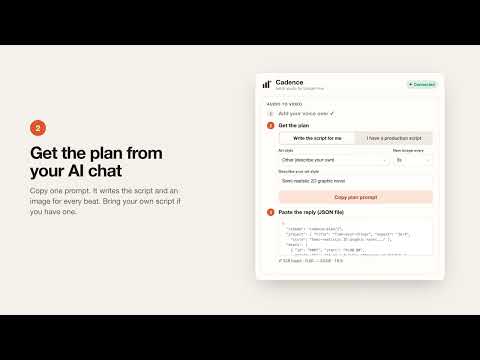
Cadence turns Google Flow into a batch studio. Paste a list of prompts, press Start, and get on with something else while every image or video is generated and saved, in order, with a name you can sort by. BRING YOUR VOICE OVER, GET A VIDEO A ten-minute explainer can need a hundred or more images, one for every few seconds of narration. Cadence's Audio to video does the whole job: 1. Add your voice over. Cadence transcribes it on your computer straight away, with word timings. 2. Copy the plan prompt into your AI chat. It writes the production script and the image plan for you, or paste your own production script and it returns just the plan. Pick from more than fifty art styles or describe your own, and choose how often a new image appears. 3. Paste the reply into Cadence and press Start. Every image is generated in Flow and saved in one folder, named by its timestamp: 0001_00-00.00.jpg, 0002_00-07.20.jpg, and so on. 4. When the images are saved, Cadence offers to open them in the Studio, with the folder and your voice over already loaded. THE STUDIO The video plays straight away, every image on the words it belongs to. Give it movement: slow zooms and pans with their speed and depth, and cuts, crossfades, slides, wipes or flashes between images. The plan can set them beat by beat, and any image can be changed by hand: drag its cuts on the timeline (they snap to the spoken words), swap in another variant, replace it, or change its motion. Undo and redo any timing change. Add subtitles timed to every word: pick a style or set the font (or upload your own), size, colours, outline and background, an entrance animation and a word effect such as highlighting the word being spoken. Drag them on the preview to place and resize them. An image that failed? Its slot stays in place with a placeholder, and one click makes it again in Flow from the plan's prompt, saved under its original name. Watch it full screen, set the voice over volume, then export the full video as an MP4, or one clip per narration beat with a placement list, ready to arrange in CapCut. Anything from 720p to 4K, at 24, 30 or 60 frames a second, saved to Downloads or any folder you choose. It all renders on your own computer. KEEP YOUR CHARACTERS CONSISTENT Add character images or full character sheets on the Character tab and give each a tag such as @maya. Every prompt that mentions the tag gets that image as a Flow reference, automatically. Pin a character to use it everywhere, or change the references for a single prompt right in the queue. FILES IN THE RIGHT ORDER, NEVER TWICE Each result is saved as soon as it's ready: 0001, 0001b, 0002 and so on, or by timestamp for a video. Before making an image Cadence checks whether it is already in your Downloads, so nothing is generated twice, and a prompt repeated in the queue is made once. Before a run says Done, every file is checked and any download that failed is saved again. If Flow fails an image, its number stays empty instead of shifting everything after it, and Cadence can make the missing ones again automatically under their original names. Choose 1K, 2K or 4K images and up to 4K video, or save everything later in one go. RUNS ON ITS OWN - Style lock adds the same style words to every prompt, so a whole video keeps one look. - Sets Flow's type, model, aspect ratio, duration and number of results before it starts. - Waits between prompts as long as you like, and cools down when Flow asks it to slow down. - Pause, resume, stop, start at any prompt, or re-make only the prompts you list. - Export a CSV of every file and the prompt it came from. - Light and dark themes. English, Türkçe, Español, Français, Deutsch and Italiano. FREE AND PRO Batch prompts, character references, ordered saving and everything under "Runs on its own" are free. Audio to video and the Studio are part of Cadence Pro: $7.99 a month or $70 a year, with a 7-day free trial. Payments are handled by Lemon Squeezy, and you can cancel at any time from the account menu. PRIVATE BY DESIGN No analytics; you sign in with Google to start. Your prompts, characters, voice over and settings stay in your browser. It works inside your own Flow tab, in your own Google account, exactly as you would by hand, and files from the Studio never leave your computer. You need your own access to Google Flow. Cadence is an independent tool and is not affiliated with or endorsed by Google.
5 out of 52 ratings
Details
- Version1.2.0
- UpdatedOctober 27, 2026
- Offered byChristian Nwodo
- Size61.59MiB
- LanguagesEnglish
- Developer
Email
nwodochristian@gmail.com - Non-traderThis developer has not identified itself as a trader. For consumers in the European Union, please note that consumer rights do not apply to contracts between you and this developer.
Privacy

Cadence: Batch Studio for Google Flow has disclosed the following information regarding the collection and usage of your data. More detailed information can be found in the developer's privacy policy.
Cadence: Batch Studio for Google Flow handles the following:
This developer declares that your data is
- Not being sold to third parties, outside of the approved use cases
- Not being used or transferred for purposes that are unrelated to the item's core functionality
- Not being used or transferred to determine creditworthiness or for lending purposes