

Caddie Watch

Overview
Live buyer-request monitor for Caddie. Watches your Whatnot stream chat and surfaces requests in your dashboard automatically.
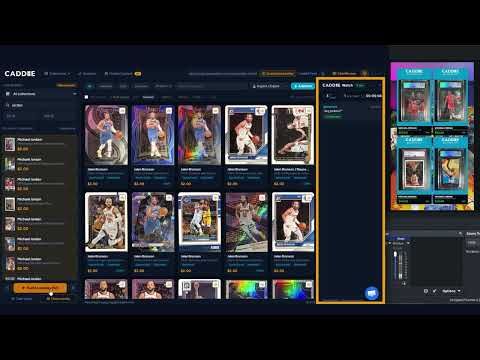
Caddie Watch is a companion extension for Caddie Pro users. It runs quietly while you stream on Whatnot, reads live chat in real time, and sends buyer requests straight to your Caddie dashboard — so you never miss a "got any Jordans?" buried in fast-moving chat. How it works Once you paste your Caddie API key into the extension popup, it activates automatically whenever you navigate to a Whatnot live stream. No bat files, no terminal. Just open your stream and go live. When a viewer asks for something — a player, a set, a grade — Caddie Watch detects the request, checks it against your inventory, and surfaces it in your dashboard with a match, sold, or not-in-inventory badge. Tap the result to push it to your overlay. What it does Reads Whatnot stream chat in real time Detects buyer requests using intent matching Matches requests against your live Caddie inventory Sends results to your Caddie dashboard instantly Stops automatically when your stream ends Requirements An active Caddie Pro subscription at app.getcaddie.now A Caddie API key (generated from your dashboard under Account) Caddie Watch only runs on Whatnot stream pages. It does not read any other browsing activity.
0 out of 5No ratings
Details
- Version1.11.0
- UpdatedSeptember 7, 2026
- Offered byCaddie Support
- Size36.53KiB
- LanguagesEnglish (United States)
- Developer
Email
support@getcaddie.now - Non-traderThis developer has not identified itself as a trader. For consumers in the European Union, please note that consumer rights do not apply to contracts between you and this developer.
Privacy

Caddie Watch has disclosed the following information regarding the collection and usage of your data. More detailed information can be found in the developer's privacy policy.
Caddie Watch handles the following:
This developer declares that your data is
- Not being sold to third parties, outside of the approved use cases
- Not being used or transferred for purposes that are unrelated to the item's core functionality
- Not being used or transferred to determine creditworthiness or for lending purposes
Support
For help with questions, suggestions, or problems, please open this page on your desktop browser