

CacheTray – Clipboard for AI Chats

Overview
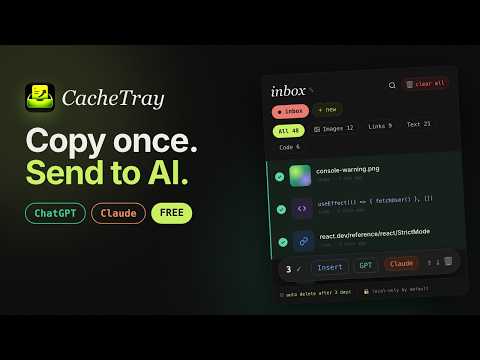
Copy screenshots, links and code — send them directly to Claude or ChatGPT in one click. Your clipboard for AI workflows.
CacheTray is a clipboard manager for AI workflows: keep screenshots, links, code snippets and notes ready for ChatGPT, Claude and your next task. Your normal clipboard remembers only the last item. CacheTray gives you a searchable clipboard history in Chrome, with workspaces, category filters and a side panel to keep useful context within reach. Select text. Paste anywhere.(no need to click clt+c) Highlight text on a supported webpage to automatically copy it to your clipboard and save it in CacheTray. Then paste it with Cmd+V or Ctrl+V — no separate copy step needed. Available to everyone, including Free users. Password fields and editable text fields are excluded. Pause auto-capture anytime. Build better AI prompts with less switching. Collect an error message, a code snippet, a documentation link and a screenshot. Select the items you need, then insert them into ChatGPT or Claude without manually downloading and attaching each image. You can also copy saved text for Gemini, NotebookLM and other tools, or insert it into supported text inputs. What you can save • Screenshots and copied images • Links and current tabs • Code snippets and error messages • Selected text, notes and research excerpts • Tasks and reminders Made for everyday work • Clipboard history: keep useful copied and selected content together. • Auto-copy selected text: highlight, save and paste with fewer steps. • Send context to AI: reuse screenshots, links, code and notes in ChatGPT or Claude. • Bulk selection: choose mixed context instead of sending one item at a time. • Search and filters: quickly find text, images, links, code or tasks. • Workspaces: separate research, projects, work and personal notes. • Favourites: mark useful clips so they are easier to find. • Chrome side panel and popup: keep your tray alongside your work or open it when needed. • Temporary history: local items automatically expire after 3 days. Favourites are not permanent storage. Take your clips to your phone Scan a QR code to pair your phone without creating an account. Install the CacheTray web app on your home screen for easy access. • Recent text, links, code and tasks sync automatically while paired. • Send images individually when you want them on your phone. • Identify images with thumbnails, previews and grid or list views. • Copy or share clips, open links, download images and delete phone transfers. • Use your phone's share menu to send content to available apps such as WhatsApp or Telegram, where supported. Free and Pro Free includes selection copying and saving, plus phone sync with: • 5 image sends per rolling 24 hours • The newest 20 clips in each category: text, links, code and tasks • 1 paired phone CacheTray Pro costs $4.99 USD/month, plus applicable taxes, and increases phone limits to: • Up to 50 images stored per phone • The newest 100 clips in each category • 2 paired phones Phone images and synced clips are temporary and available for 24 hours on both plans. Deleting an image does not reset the Free send allowance. Pro image slots become available again when images are deleted or expire. Cancel through Manage subscription. Useful for developers collecting debugging context, students gathering research, writers saving references, designers collecting visual inspiration and anyone who regularly moves text, links or screenshots into AI chats. Privacy and control Your tray is stored locally in your browser by default. While capture is enabled, selecting webpage text replaces your clipboard contents with that selection. You can pause capture at any time. Pairing a phone enables temporary cloud transfers: recent text, links, code and tasks sync automatically, and images upload only when you send them. Content you choose to send to an AI chat or share with another app is received by that service. No account is required for local use or QR pairing. CacheTray does not sell your clipboard content or use it for advertising or AI model training. Optional Pro billing is handled by Dodo Payments. Website and phone app: https://cachetray.gitflex.lol
5 out of 518 ratings
Details
- Version1.8.2
- UpdatedOctober 10, 2026
- Size264KiB
- LanguagesEnglish
- DeveloperWebsite
Email
vinayjjoshi.310@gmail.com - Non-traderThis developer has not identified itself as a trader. For consumers in the European Union, please note that consumer rights do not apply to contracts between you and this developer.
Privacy

CacheTray – Clipboard for AI Chats has disclosed the following information regarding the collection and usage of your data. More detailed information can be found in the developer's privacy policy.
CacheTray – Clipboard for AI Chats handles the following:
This developer declares that your data is
- Not being sold to third parties, outside of the approved use cases
- Not being used or transferred for purposes that are unrelated to the item's core functionality
- Not being used or transferred to determine creditworthiness or for lending purposes