

BYN prices in USD/EUR/RUB

Overview
Automatically converts BYN prices into USD, EUR, RUB and 30+ more currencies on Belarusian websites. No manual conversion needed.
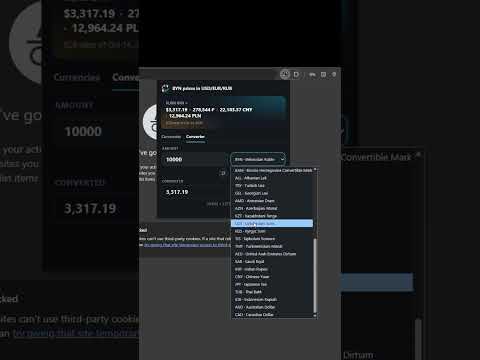
BYN prices in USD/EUR/RUB Belarusian marketplaces price everything in Belarusian rubles, and comparing an offer on one site with an offer on another means reaching for a converter every time. This extension does it for you: every BYN price gets its equivalent printed right underneath, on every page you already visit. The same works the other way round on Polish sites: their prices are in złoty, and the conversion beside them includes Belarusian rubles, so an apartment in Warsaw and one in Minsk can be weighed in the same money. For comparison only ------------------- The converted figures are there to help you weigh one offer against another across different platforms. They are a reference, nothing more: every listing is priced in the site's own currency, and every deal, payment and agreement is made in it. Rates move daily, so treat a converted price as a guide to roughly what a listing is worth, never as the amount anyone is asking. Where it works -------------- Belarus, prices in Belarusian rubles: - Shops: catalog.onliner.by with its search box suggestions, compare page and basket, 21vek.by, wildberries.by and ozon.by — from the main page and search results to a product page, other sellers' offers and the basket total. - Classifieds: onliner.by and kufar.by. - Property, for sale and to rent: onliner.by, kufar.by, realt.by and flatby.by — including the price per square metre where a site shows one. - Cars and other vehicles: onliner.by, kufar.by, av.by and abw.by. Poland, prices in złoty: - Marketplace: allegro.pl — the main page, search results, offer pages, product comparison and the basket. - Price comparison: ceneo.pl — the main page, search results and product pages, the search box suggestions and the basket. - Classifieds: olx.pl — the main page, search results and ad pages; allegrolokalnie.pl — the main page, search results and offer pages. - Property: otodom.pl — the main page, search results and offer pages, with the price per square metre where it is shown; gratka.pl — the main page, search results, developments and offer pages, with the price per square metre. - Cars: otomoto.pl — the main page, search results and offer pages. Search results, ad pages, cards in a map popup and the totals a booking form works out are all covered. Where a site offers currencies of its own, the prices it writes in its home currency are the ones converted. Currencies ---------- USD, EUR, RUB and BYN to begin with. A price is never converted into its own currency, so BYN appears beside Polish prices but not beside Belarusian ones. Change the list from the extension's button in the toolbar and drag the currencies into the order you want — the order they appear in beside a price. Untick them all and the extension stops converting until you pick one again. The following currencies are supported: USD, EUR, RUB, BYN, UAH, PLN, CZK, HUF, RON, MDL, GBP, CHF, NOK, SEK, DKK, ISK, RSD, MKD, BAM, ALL, TRY, GEL, AMD, AZN, KZT, UZS, KGS, TJS, TMT, AED, SAR, INR, CNY, JPY, THB, IDR, AUD and CAD. In the popup ------------ - Currencies: the list above, each with what it is worth in rubles. - Converter: any amount from any of these currencies into another, without opening a site. It remembers what you last converted. - Sites: a switch for every site, grouped by country. Turn off one site, one part of a site — a marketplace's property section, say — or a whole country at once. Exchange rates -------------- Rates come from the Frankfurter API, which publishes the European Central Bank's reference rates. The ECB updates them once per working day at around 16:00 Central European Time, and they do not move again until the next publication — Friday's rates still stand on Sunday. The extension refreshes shortly after each publication, between 17:15 and 17:30 CET, and keeps the result in your browser. Everything you browse after that reads those stored rates, so ordinary browsing makes no requests at all, and prices still convert if you go offline. Frankfurter was chosen because it answers from anywhere. The National Bank of Belarus publishes its own rates, but that service is not reachable from every country, so prices would stop converting the moment you travelled or switched on a VPN. Here they keep working wherever you browse from. Part of the page ---------------- Nothing to switch on, click or hover over: open a search page and the conversions are already on the cards, open a listing and they are under its price. Each one borrows the look of the price it belongs to — the site's own font, weight and colour, a little smaller and quieter so the original price stays the one you see first — and takes whatever room is going, on one line or stacked. Only the asking price is converted; old crossed-out prices, monthly payments, loan ranges, add-on services such as an extended warranty and "from N per month" offers are left exactly as they are. Privacy ------- The extension talks to one address, the rates API, and asks it only for exchange rates. It sends nothing about you, the pages you open or the prices you look at. Your settings and the latest rates are stored in your own browser, and nowhere else.
5 out of 51 rating
Details
- Version1.4.2
- UpdatedNovember 11, 2026
- Offered byDzmitry
- Size111KiB
- Languages2 languages
- Developer
Email
grunvaldatw@gmail.com - Non-traderThis developer has not identified itself as a trader. For consumers in the European Union, please note that consumer rights do not apply to contracts between you and this developer.
Privacy

This developer declares that your data is
- Not being sold to third parties, outside of the approved use cases
- Not being used or transferred for purposes that are unrelated to the item's core functionality
- Not being used or transferred to determine creditworthiness or for lending purposes