


Overview
Record and transcribe your meetings with AI Meeting Assistant
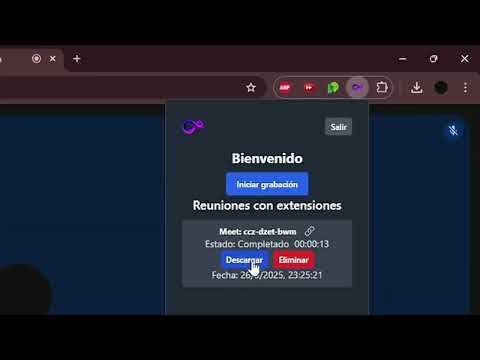
ByMeet helps you manually record and keep recordings of meetings, browser tabs, windows and screens that you choose in Chrome. Start recording from the extension, or use Chrome's sharing picker to select another tab, a window or a screen. Pause, resume and stop from the recording controls. Enable or disable microphone capture in Settings. Audio availability depends on Chrome, your operating system, the selected source and the permissions you grant. A recording can be saved as video even when no audio is available. Keep recordings locally and export available MP4 video and MP3 audio. Sign in to ByMeet to upload recordings and access your uploaded recording history. Each uploaded recording provides cloud download controls, including on another computer where its local file is absent. When Chrome Sync is enabled, recording preferences and compact metadata for uploaded recordings can follow you across computers using the same Chrome account. Uploaded history is scoped to your signed-in ByMeet account. Video, audio, caption text and authentication tokens are not stored in Chrome Sync. Recording files remain on their original device or in your ByMeet cloud account. On supported Google Meet, Zoom web and Microsoft Teams web pages, ByMeet can collect captions that the provider makes available when caption capture is enabled. Available captions can be exported as TXT. For uploaded recordings with audio, a transcript can also become available after ByMeet finishes cloud processing. Caption availability, timing and speaker labels depend on the provider. ByMeet does not enable Chrome Live Caption or provide local speech recognition in real time. Record only content you are authorized to record. Cloud upload and cloud downloads require your ByMeet account and an internet connection; Chrome Sync is subject to the browser's sync settings and storage limits.
5 out of 52 ratings
Details
- Version0.3.18
- UpdatedOctober 9, 2026
- Size10.2MiB
- Languages3 languages
- DeveloperWebsite
Email
info@bymeet.ai - Non-traderThis developer has not identified itself as a trader. For consumers in the European Union, please note that consumer rights do not apply to contracts between you and this developer.
Privacy

ByMeeet AI - AI Meeting Assistant has disclosed the following information regarding the collection and usage of your data. More detailed information can be found in the developer's privacy policy.
ByMeeet AI - AI Meeting Assistant handles the following:
This developer declares that your data is
- Not being sold to third parties, outside of the approved use cases
- Not being used or transferred for purposes that are unrelated to the item's core functionality
- Not being used or transferred to determine creditworthiness or for lending purposes
Support
For help with questions, suggestions, or problems, visit the developer's support site