

Business Suite Voice Note
5 ratings
)
Overview
Add voice message functionality to Meta Business Suite
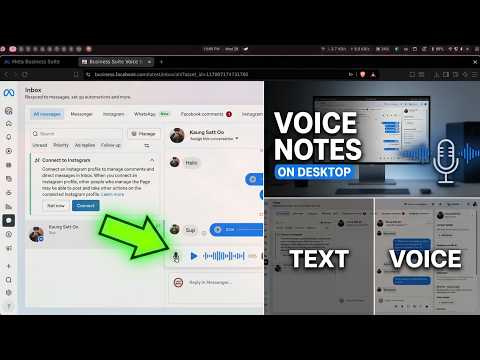
Add lightning-fast, native voice notes directly to Meta Business Suite. Managing customer inquiries through text can be slow and impersonal. This extension seamlessly integrates a "Push-to-Talk" microphone button right next to the attachment icon inside your Meta Business Suite inbox, allowing you to record and send professional audio replies in seconds. ✨ Key Features: * Seamless UI Integration: Looks and feels exactly like a native Meta feature. * Click-to-Record: Frees up your hands. Click once to start recording, speak your message, and click 'Done' to instantly send. * Live Audio Visualizer: See a real-time waveform of your voice so you know your microphone is picking up sound perfectly. * Universal MP3 Support: Automatically converts your recordings into highly compressed, universally playable .mp3 files. Your customers can listen flawlessly on any device (iPhone, Android, or desktop). * Privacy First: All audio is processed locally on your own computer. No voice data is ever sent to third-party servers. How to use: * Install the extension. * Open your Meta Business Suite Inbox. * Click the new microphone icon in the chat toolbar. * Allow microphone permissions when prompted. * Click, speak, and send! Repository - https://github.com/0xkev21/business-suite-vn
5 out of 55 ratings
Details
- Version1.3.1
- UpdatedSeptember 18, 2026
- Offered byKev
- Size68.2KiB
- LanguagesEnglish
- Developer
Email
kev992199@gmail.com - Non-traderThis developer has not identified itself as a trader. For consumers in the European Union, please note that consumer rights do not apply to contracts between you and this developer.
Privacy

This developer declares that your data is
- Not being sold to third parties, outside of the approved use cases
- Not being used or transferred for purposes that are unrelated to the item's core functionality
- Not being used or transferred to determine creditworthiness or for lending purposes
Support
For help with questions, suggestions, or problems, visit the developer's support site