Overview
Extract all image and video URLs from the current page.
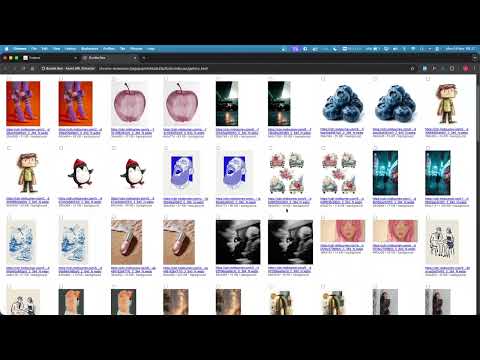
📄 Chrome Extension – Asset Extractor 1. Overview A Chrome extension that allows users to extract, preview, filter, view, and download image and video assets from any webpage. The extension provides both a popup interface for quick browsing and a dedicated viewer tab for full inspection of each asset. 2. Goals Provide an easy way to list all image and video URLs from a page. Allow previewing assets directly in the extension popup. Support a dedicated viewer tab for inspecting a single asset in a container (not just raw asset). Enable bulk selection & downloading of assets. Add filtering capabilities (by file type, size, or dimensions). 3. Target Users Designers: extract and preview high-resolution assets for reference. Developers: debug frontend implementations or CDN assets. Content creators: collect multiple images/videos for inspiration or reuse. 4. Features Core Features (MVP) Get Assets Extract from <img>, <video>, <source>, <picture>, and CSS background-image. Deduplicate URLs. Preview Assets in Popup Display thumbnails for images. Display playable video previews (no autoplay). Show fallback text if preview unavailable. Gallery (Primary Inspection Surface) From the popup, user opens a gallery tab (gallery.html) showing all extracted assets in a responsive grid. Clicking a tile opens the original asset URL in a new browser tab. Optional: a lightweight inline “Details” overlay in the gallery shows metadata (URL, type, dimensions) without leaving the page. Handles large lists efficiently (lazy loading/chunked rendering). Advanced Features (Phase 2–3) Multi-Select & Download Checkbox next to each asset in popup. “Download Selected” button. Download as: One-by-one (Chrome downloads API). Single ZIP (via JSZip). Filtering By File Type: image, video, background, or all. By Dimensions (width/height). By File Size (if retrievable via headers). Export Export asset URLs to CSV or JSON. Sorting Sort by filename, URL, dimension, or type. 5. User Flow User opens a website. User clicks the extension icon → popup opens. Extension auto-fetches assets (or user clicks "Get Assets"). Assets are displayed with: Thumbnail / video preview. URL (clickable). Checkbox for selection. User actions: Click “Open All in New Tab” → opens gallery tab with grid of all collected assets. In gallery: clicking a tile opens the original asset in a new tab; optional "Details" overlay shows metadata inline. Select some assets → click “Download Selected” → gets ZIP or individual downloads. Apply filters → e.g., only images > 500px wide. Export asset list → CSV/JSON. 6. Technical Requirements Chrome Extension Manifest v3 Permissions: activeTab (read current page assets) scripting (inject asset scraper) downloads (save files) storage (optional; ephemeral handoff via chrome.storage.session) Popup UI: HTML/CSS/JS Gallery UI: gallery.html + gallery.js (responsive grid showing all assets; optional inline details overlay) ZIP generation: JSZip Storage: none (no user data). May use chrome.storage.session for in-memory handoff. 7. Success Metrics Functional: Extracts >95% of visible image/video assets on a page. Usability: User can extract, inspect, and download within 3 clicks. Performance: Asset extraction runs in <1 second on typical pages. 8. Future Considerations Support for audio files (<audio>, source). Support for lazy-loaded assets (scroll detection or MutationObserver). Dark mode UI. Gallery mode in viewer tab (next/previous navigation across assets). Support for Firefox (via WebExtensions API). 9. Feasibility Review (Senior Dev) Core: Get Assets :white_check_mark: Extract from <img>, <video>, <source>, <picture> :white_check_mark: Extract CSS background-image URLs (computed styles; ignore gradients/data URIs) :white_check_mark: Deduplicate URLs (normalize to absolute; consider stripping hashes) Preview in Popup :white_check_mark: Image thumbnails (lazy-loaded) :white_check_mark: Video previews (muted/controls; autoplay disabled) :white_check_mark: Fallback text for unsupported previews Gallery (Primary) :white_check_mark: gallery.html responsive grid; recommend virtualization for 300+ items :white_check_mark: Handoff via chrome.storage.session (ephemeral; MV3) :white_check_mark: Tiles open original in new tab; optional inline details overlay Multi-Select & Download :white_check_mark: One-by-one via chrome.downloads.download (public URLs; auth-protected may fail) :white_check_mark: ZIP via JSZip (requires fetching blobs; needs host_permissions; large memory usage risk) Filtering :white_check_mark: By type (image/video/background) :white_check_mark: By dimensions (measure lazily; background images expensive to measure) :x By file size via headers is unreliable due to CORS; treat as best-effort/optional Export :white_check_mark: CSV and JSON of URLs + metadata Sorting :white_check_mark: By filename/URL/type :white_check_mark: By dimensions (after measurement; may be missing for some assets)
Details
- Version1.0
- UpdatedNovember 26, 2025
- Size59.98KiB
- LanguagesEnglish (United States)
- Developer
Email
ilhamsaputrajati@gmail.com - Non-traderThis developer has not identified itself as a trader. For consumers in the European Union, please note that consumer rights do not apply to contracts between you and this developer.
Privacy

This developer declares that your data is
- Not being sold to third parties, outside of the approved use cases
- Not being used or transferred for purposes that are unrelated to the item's core functionality
- Not being used or transferred to determine creditworthiness or for lending purposes