


Overview
Queue many video prompts at once in Flow and save every finished video to your Downloads folder automatically.
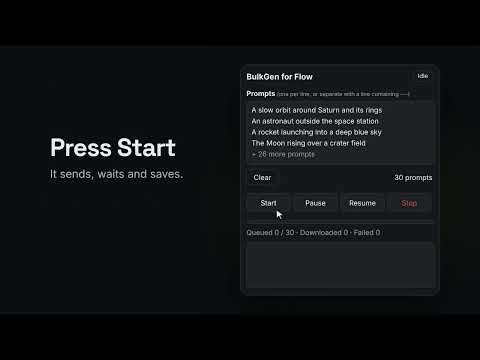
BulkGen turns Flow into a batch video maker. Paste all your prompts once, pick your settings, click Start, and walk away. BulkGen sends the prompts one after another, keeps Flow's queue full, and saves each finished video to your Downloads folder with a clear name. Free and open source (MIT license). WHAT IT DOES - One prompt per line, or separate longer prompts with a line containing --- - Character and world notes plus a style line added to every prompt, so a series stays consistent - Reads the video models Flow offers and sets the one you pick; seconds, resolution and aspect follow that model - Optional reference images (Ingredients) attached to every prompt, for models that accept them - Keeps up to your "At once" number of videos generating at the same time - Saves files as Downloads/BulkGen/flow_001_title.mp4, numbered in prompt order even when videos finish out of order - Downloads in 720p original or 1080p upscaled - Checks Flow's own credit estimate before sending and sends nothing if a video would cost more than your limit - Pause, Resume and Stop at any time; if the page reloads, the run picks up where it left off - Retries failed downloads and tells you clearly when it gives up - "Test with 1 prompt" button and a log you can export HOW TO USE 1. Open your project on flow.google.com. 2. Click the BulkGen icon to open the side panel. 3. Paste your prompts, choose the model and settings, and click Start. GOOD TO KNOW - You need your own Flow account and credits. Every video uses credits as Flow shows them. - While a run is going, Chrome shows a bar saying BulkGen is debugging the tab. BulkGen uses this only to click Flow's buttons, because Flow ignores clicks from scripts. Keep DevTools closed on the Flow tab during a run. - The first time, Chrome may ask whether flow.google.com may download multiple files. Choose Allow. PRIVACY Everything stays in your browser. No servers, no accounts, no analytics, no data collection. BulkGen never asks for your password. Website: https://bulkgen.mmd-rehan.com Source code and issues: https://github.com/mmd-rehan/bulkgen-flow-extention BulkGen for Flow is an independent project and is not made, endorsed or supported by Google.
0 out of 5No ratings
Details
- Version1.9.6
- UpdatedOctober 25, 2026
- Size46.67KiB
- LanguagesEnglish
- DeveloperWebsite
Email
bulkgen@mmd-rehan.com - Non-traderThis developer has not identified itself as a trader. For consumers in the European Union, please note that consumer rights do not apply to contracts between you and this developer.
Privacy

This developer declares that your data is
- Not being sold to third parties, outside of the approved use cases
- Not being used or transferred for purposes that are unrelated to the item's core functionality
- Not being used or transferred to determine creditworthiness or for lending purposes
Support
For help with questions, suggestions, or problems, visit the developer's support site