


Overview
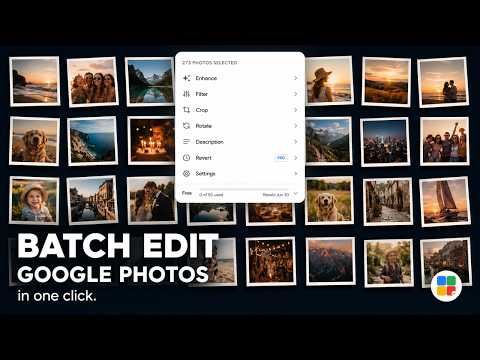
Bulk edit your Google Photos library — enhance, filter, crop, rotate, and describe multiple photos at once.
📸 Bulk Photo Editor — for Google Photos Google Photos is great at storing your library. It's not so great at letting you edit it in bulk. Every enhance, filter, crop, or rotation has to be done one photo at a time — open a photo, make the edit, go back, open the next one, repeat. For a handful of photos that's fine. For an album of 50, 100, or 500 photos, it's hours of repetitive clicking. Bulk Photo Editor fixes that. Select any number of photos in Google Photos, click the Bulk button that appears in the toolbar, pick your edit — and the extension handles the rest, automatically applying it to every photo in your selection while you watch (or step away). ✨ WHAT YOU CAN DO • Auto-enhance — apply Google Photos' one-tap enhancement across your whole selection at once, instead of opening each photo individually • Apply a filter — choose any of Google Photos' built-in looks (Vivid, Playa, Honey, Isla, Desert, Warm, and more) and apply it to every selected photo • Crop to a ratio — set a consistent aspect ratio (1:1 square, 4:5 portrait, 16:9 widescreen, 3:2, and more) across multiple photos in a single pass • Rotate or flip — straighten a batch of landscape photos, or flip a set that came out mirrored, without touching each one separately • Add or update descriptions — write one caption and apply it to every selected photo, or append text to what's already there • Revert to original — made an edit you regret? Undo it across your whole selection at once 👥 WHO IT'S BUILT FOR -> Real estate photographers who shoot 80 photos of a property and need every one enhanced and cropped to 16:9 before the listing goes live. -> Travel photographers returning from a trip with 400 similar frames that all need the same warm filter. -> Sellers who need square crops on a product catalogue before uploading to their shop. -> Archivists captioning hundreds of scanned family photos. -> Anyone who has ever stared at a Google Photos album and wished they could just select all and enhance. ⚙️ HOW IT WORKS Once installed, a "Bulk" button appears automatically in Google Photos' multi-select toolbar — the same bar that shows up when you select photos for sharing or downloading. Click it, choose an action, confirm, and the extensiondrives Google Photos' own editor for each photo in your selection, exactly as you would by hand — just automatically. There's nothing to configure and no separate interface to learn. 🔒 YOUR PHOTOS STAY YOURS Nothing leaves your browser. Bulk Photo Editor runs entirely against photos.google.com in your own Chrome session — your photos are never uploaded, copied, or sent to any server. The only thing stored locally is a small counter tracking how many photos you've edited this month, saved in your browser via chrome.storage.local. 💳 FREE TO START Free plan: 50 photos/month — enough to edit a full album end to end. Plus plan: 500 photos/month. Pro plan: unlimited. Upgrade anytime from the extension panel. No account required to install. ❓ FREQUENTLY ASKED QUESTIONS Q: Does Google Photos have a bulk edit feature? A: No — Google Photos' editor is built around one photo at a time. Even when you have multiple photos selected, the edit options disappear. Bulk Photo Editor adds that missing capability by automating the editor across your entire selection. Q: Can I apply the same filter to multiple Google Photos at once? A: Yes. Select the photos you want, click Bulk, choose Filter, pick a look like Vivid or Playa, and the extension applies it to every photo in the selection automatically. It's the fastest way to give a whole album a consistent style. Q: How do I auto-enhance multiple photos in Google Photos? A: Select them, click Bulk, and choose Enhance. The extension opens each photo, applies Google Photos' one-tap Auto Enhance, saves it, and moves to the next — the same result as enhancing by hand, without the repetition. Q: Can I crop multiple photos to the same aspect ratio? A: Yes. The Crop action lets you pick a ratio — 1:1, 4:5, 16:9, 3:2, or others — and apply it across every selected photo in one pass. Useful for preparing Instagram posts, listing photos, or any set that needs consistent dimensions. Q: What about rotating a whole batch of photos at once? A: Select all the photos that need rotating or flipping, click Bulk, choose Rotate, pick a direction, and the extension handles every one. No more opening each sideways photo individually. Q: What if I close the browser or Chrome crashes mid-batch? A: Your progress is saved. If a batch is interrupted — by a crash, a restart, or closing the tab — Bulk Photo Editor picks up where it left off when you return to Google Photos. Q: Does it work on mobile or the Google Photos app? A: No — Bulk Photo Editor is a Chrome extension and runs on the Google Photos website (photos.google.com) in a desktop Chrome browser. It doesn't work on mobile browsers or inside the Google Photos app. ──────────────────────────────────────── Bulk Photo Editor is an independent Chrome extension. It is not affiliated with, endorsed by, or sponsored by Google LLC. "Google Photos" is a trademark of Google LLC
3.5 out of 58 ratings
Details
- Version1.0.0
- UpdatedJune 14, 2026
- Size101KiB
- LanguagesEnglish
- DeveloperWebsite
Email
aarohan789@gmail.com - Non-traderThis developer has not identified itself as a trader. For consumers in the European Union, please note that consumer rights do not apply to contracts between you and this developer.
Privacy

This developer declares that your data is
- Not being sold to third parties, outside of the approved use cases
- Not being used or transferred for purposes that are unrelated to the item's core functionality
- Not being used or transferred to determine creditworthiness or for lending purposes
Support
For help with questions, suggestions, or problems, visit the developer's support site