


Overview
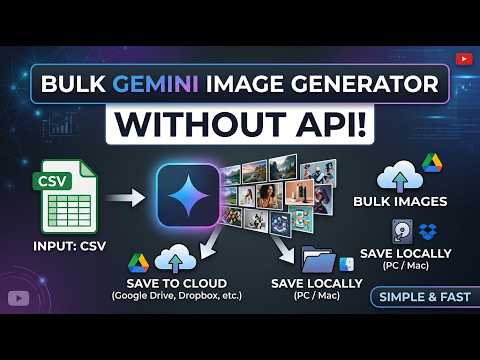
Bulk generate custom images from Gemini AI without API. Save locally, or upload to cloud storage.
Bulk Gemini Image Generator is a Chrome extension that allows you to generate multiple AI images in bulk using Gemini, with consistent branding, and save them directly to your device. Key Features: Bulk Image Generation - Generate multiple AI images at once based on data from a CSV file. Simply fill in the headline, description, and article topic, and the extension will create complete prompts for each row of data. Consistent Branding - Every image is generated using a master template that maintains consistent colors, layout, typography, and visual elements for the aicoding.courses brand. Just change 3 parameters (accent color, headline, CTA text) and let AI handle the rest. Fun Control Panel - A modern floating panel on top of the Gemini page. With Start, Pause, and Status buttons, you can monitor the image generation process in real-time. Auto Pause & Resume - The extension features a pause function that allows you to stop the process anytime and resume from the last point without losing progress. Direct Device Saving - Once each image is finished, the extension automatically downloads and saves it to your downloads folder. No more manual copy-pasting. Anti-Detection - Random delays between generations (8-18 seconds) and natural input simulation make the process appear like a regular human user. How It Works Local Mode (Free) Upload CSV file with columns: topic,headline,short_description,cta_text Open gemini.google.com and click the extension panel Click Start Generating — extension automates prompt input & image generation Each generated image is saved directly to your Downloads folder Cloud Mode (Premium) Prepare a Google Sheet with same columns + image_url column for writeback Publish sheet as CSV (File → Share → Publish to web → CSV) Deploy Apps Script as Web App (/exec endpoint) for writeback Enter: Sheet CSV URL, Apps Script URL, and R2 Upload Token in options Switch mode to Cloud and click Load from Google Sheet Click Start Generating — images upload to R2 & URLs write back to your Sheet automatically Note: No demo image limit, generation runs on your own Google account, so your quota is your Google account's quota. A license unlocks premium features beyond generation limits.
0 out of 5No ratings
Details
- Version2.0
- UpdatedOctober 14, 2026
- FeaturesOffers in-app purchases
- Size47.7KiB
- LanguagesEnglish
- DeveloperWebsite
Email
support@aicoding.courses - Non-traderThis developer has not identified itself as a trader. For consumers in the European Union, please note that consumer rights do not apply to contracts between you and this developer.
Privacy

This developer declares that your data is
- Not being sold to third parties, outside of the approved use cases
- Not being used or transferred for purposes that are unrelated to the item's core functionality
- Not being used or transferred to determine creditworthiness or for lending purposes
Support
For help with questions, suggestions, or problems, please open this page on your desktop browser