


Overview
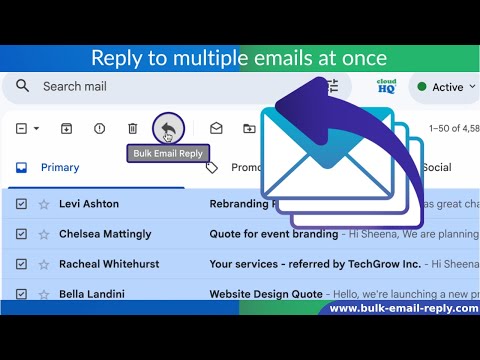
Select multiple emails in Gmail inbox and reply to all of them with one click.
Select multiple emails in Gmail inbox and reply to all of them with one click. Bulk Email Reply lets you respond to many emails at once inside Gmail. Simply select your messages and click the Bulk Email Reply button. You can send replies instantly or save them as drafts to review first. AI generates smart and personal responses in seconds. Professional templates are built right in so every reply looks clean and consistent. It also works with Gmail Auto BCC to keep your CRM and records updated automatically. Perfect for handling repetitive email replies faster and reducing inbox stress. Integrate with AI and answer multiple emails with one click. 🤖 AI draft generation for multiple emails Email Bulk Reply can use AI to generate drafts for many selected emails at once. The AI reads the message context and helps create clear, friendly, and personal replies. This is great when you want to answer many customers, leads, applicants, or clients, but still want each reply to feel natural and helpful. You can review the AI generated drafts before sending, edit anything you want, and then send when you are ready. 📄 Import AI prompts from Google Drive You can also import prompts from your Google Drive files. This makes it easy to reuse approved company instructions, support answers, sales scripts, HR replies, policy text, or any other prompt stored in a Google Doc. For example, you can keep your best AI prompts in Google Drive and use them inside Email Bulk Reply whenever you need them. This helps your team keep replies consistent, accurate, and on-brand. Email Bulk Reply is perfect for handling repetitive emails faster, saving time, and reducing inbox stress. ✅ Main features: • Reply to many Gmail emails in one action • Select multiple emails and respond with one click • Use AI to write smart and personal replies • Use professional templates for clean and consistent emails • Send replies instantly or save them as drafts to review first • Work directly inside Gmail • Keep your CRM and records updated with Gmail Auto BCC • Save time on repetitive email replies 💡 Use cases: Customer support: Reply to many customers who ask the same question, such as pricing, account help, product details, refunds, or troubleshooting steps. Sales follow-ups: Respond to multiple leads with product information, pricing details, next steps, or follow-up messages. Recruiting and HR: Reply to many job applicants with interview details, status updates, thank-you messages, or next steps. Small business: Answer quote requests, booking questions, appointment confirmations, and client follow-ups faster. Stop copying and pasting the same reply again and again. Use Email Bulk Reply to reply faster, stay organized, and keep your Gmail cloudHQ. Helping your productivity one click at a time. Visit our Website: https://www.bulk-reply.com/ Explore Pricing: https://www.bulk-reply.com/pricing Need Help? Support Page: https://support.cloudhq.net/category/browser-extensions/gmail-bulk-reply/ Discover Insights. Blog: https://blog.cloudhq.net/ Google Workspace, Google Sheets, Google Drive, Google Alerts and Gmail are trademarks of Google LLC. Use of this trademark is subject to Google Permissions. cloudHQ is trademark of CloudHQ LLC. https://www.cloudhq.net/trademark
5 out of 514 ratings
Details
- Version1.0.0.10
- UpdatedAugust 3, 2026
- Size583KiB
- Languages11 languages
- DevelopercloudHQWebsite
2247 29th Avenue San Francisco, CA 94116 USEmail
support@cloudhq.netPhone
+1 415-509-6721 - TraderThis developer has identified itself as a trader per the definition from the European Union and committed to only offer products or services that comply with EU laws.
- D-U-N-S064785518
Privacy

Bulk Email Reply by cloudHQ has disclosed the following information regarding the collection and usage of your data. More detailed information can be found in the developer's privacy policy.
Bulk Email Reply by cloudHQ handles the following:
This developer declares that your data is
- Not being sold to third parties, outside of the approved use cases
- Not being used or transferred for purposes that are unrelated to the item's core functionality
- Not being used or transferred to determine creditworthiness or for lending purposes
Support
For help with questions, suggestions, or problems, visit the developer's support site