


Overview
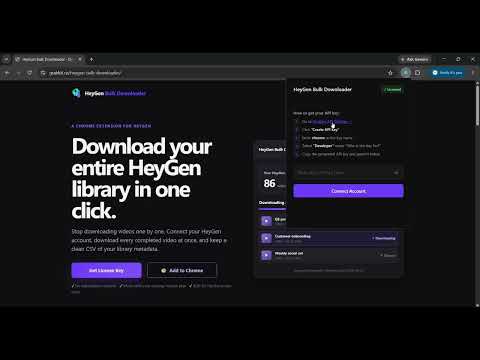
Download your entire HeyGen video library in one click
Bulk Downloader for HeyGen lets you download your entire HeyGen video library in one click - automatically organized into a folder on your computer. If you have a bunch of videos in HeyGen, downloading them one by one is painful. Open the video, find the download button, wait, repeat. Bulk Downloader for HeyGen eliminates that entirely and allows you to have a local copy of your entire HeyGen library. HOW IT WORKS ──────────────────────────────────── 1) Paste your HeyGen API key (free from HeyGen Settings → API) 2) The extension fetches every completed video in your account 3) Click "Download All Videos" 4) All your videos save automatically to a dated folder: Downloads / HeyGen Export 2026-06-18 / That's it. No clicking through individual videos. No manual downloading. Everything lands organized and ready to use. WHAT YOU GET ──────────────────────────────────── ✦ Bulk download your entire HeyGen library in one click ✦ Videos auto-organized into a clean dated folder ✦ Captioned video versions downloaded when available ✦ Full library CSV export - title, date, duration, URLs for every video ✦ Handles accounts with hundreds of videos automatically (full pagination) ✦ Works with every HeyGen plan - Free, Creator, Pro, and Business ✦ Your API key stays in your browser - never sent to our servers WHO THIS IS FOR ──────────────────────────────────── → HeyGen creators who need their video files locally for editing → Marketing teams archiving campaign video assets → Agencies delivering video files to clients → Anyone migrating their HeyGen library to another platform → Content teams who need local backups of generated videos SETUP TAKES UNDER 2 MINUTES ──────────────────────────────────── 1. Install this extension 2. Paste your HeyGen API key (found at app.heygen.com/settings → API tab) 3. Click "Download All Videos" Your HeyGen API key is free to obtain. HeyGen may require a small minimum wallet top-up to activate API access - this is separate from your web plan and is set directly through HeyGen. Fetching and downloading your videos does NOT consume any HeyGen generation credits. PERMISSIONS EXPLAINED ──────────────────────────────────── This extension requests the following Chrome permissions: - Storage — saves your API key and license key locally in your browser - Downloads — triggers video file downloads to your Downloads folder All API calls go directly from your browser to HeyGen's servers. We do not operate a backend that receives your data. IMPORTANT NOTES ──────────────────────────────────── - Requires a HeyGen account and API key - Downloads completed videos only — videos still processing are skipped - This is an independent third-party tool and is not affiliated with, endorsed by, or sponsored by HeyGen Inc. SUPPORT ──────────────────────────────────── Questions or issues? Visit grabkit.co/heygen-bulk-downloader
5 out of 51 rating
Details
- Version1.0.4
- UpdatedOctober 7, 2026
- Size350KiB
- Languages4 languages
- DeveloperWebsite
Email
support.grabkit@gmail.com - Non-traderThis developer has not identified itself as a trader. For consumers in the European Union, please note that consumer rights do not apply to contracts between you and this developer.
Privacy

This developer declares that your data is
- Not being sold to third parties, outside of the approved use cases
- Not being used or transferred for purposes that are unrelated to the item's core functionality
- Not being used or transferred to determine creditworthiness or for lending purposes