

Bulk Delete for AI Studio
ExtensionTools19 users

Overview
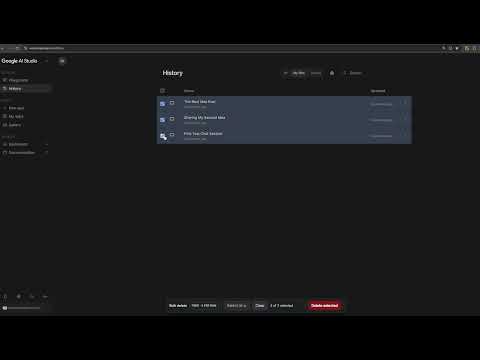
Adds checkboxes and a "Delete selected" toolbar to the Google AI Studio library, so you can clear out many chats at once.
Google AI Studio's library only lets you delete chats one at a time, through the `⋮` menu on each row. This extension adds checkboxes and a **Delete selected** toolbar so you can clear out a long history in one pass.
0 out of 5No ratings
Details
- Version1.1.0
- UpdatedAugust 11, 2026
- FeaturesOffers in-app purchases
- Offered bybondelero
- Size28.24KiB
- LanguagesEnglish (United States)
- DeveloperKERWYN MITCHELL
35 Wiltshire Close Chatham ME5 7SR GBEmail
bondelero@gmail.comPhone
+44 7830 008108 - TraderThis developer has identified itself as a trader per the definition from the European Union and committed to only offer products or services that comply with EU laws.
Privacy

Manage extensions and learn how they're being used in your organization
The developer has disclosed that it will not collect or use your data. To learn more, see the developer’s privacy policy.
This developer declares that your data is
- Not being sold to third parties, outside of the approved use cases
- Not being used or transferred for purposes that are unrelated to the item's core functionality
- Not being used or transferred to determine creditworthiness or for lending purposes
Support
For help with questions, suggestions, or problems, visit the developer's support site