


Overview
Report bugs with a screenshot or recording, plus console, network and the steps that led there.
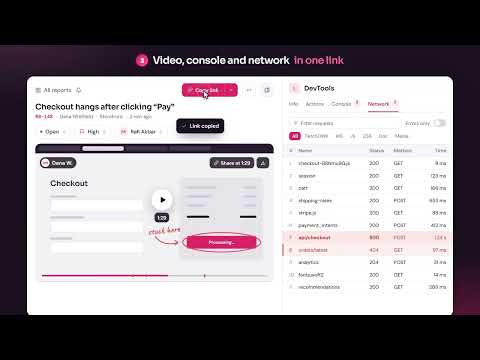
Stop describing bugs. Show them. BugBerry turns a bug into a report your developers can act on right away: a screenshot or screen recording with the console logs, network requests and the exact steps that led there, attached automatically and shared with one link. No more "it doesn't work" followed by a long thread of questions. BugBerry captures what a developer would ask for, at the moment the bug happens. CAPTURE IN ONE CLICK • Screenshot the visible area or select part of the page • Record the current tab, a window or your whole screen, with your voice if you like • Draw on screenshots with pen, boxes, arrows and text, and blur anything sensitive EVERYTHING DEVELOPERS NEED, ATTACHED AUTOMATICALLY • Console messages and errors, with the file and line that failed • Network requests with status and timing, failed ones highlighted • Clicks, key presses and navigation as reproduction steps on the video timeline • Browser, operating system, screen size and page URL PRIVATE BY DEFAULT • Passwords, tokens and cookies in captured requests are redacted before upload • When recording a tab, only that tab is recorded • You review every report before it is created SHARE, TRACK AND FIX • One link per report, shared with your workspace, your company or anyone with the link • Workspaces with comments, mentions, status, priority and assignee • Send reports to your issue tracker or team chat, by hand or automatically for every new report • A built-in MCP server lets AI coding agents read a report and work on the fix HOSTED OR SELF-HOSTED Use the hosted BugBerry app, or run your own server for free with Docker Compose. BugBerry is open source under the AGPL-3.0 license. HOW IT WORKS 1. Click the BugBerry icon and choose a screenshot or a recording 2. Reproduce the bug while logs and steps are captured in the background 3. Review, mark it up and create the report 4. Share the link, or send it to your tracker or your AI agent Website and documentation: https://bugberry.yuisalabs.com
5 out of 51 rating
Details
- Version0.9.0
- UpdatedOctober 26, 2026
- Size910KiB
- LanguagesEnglish (United States)
- DeveloperErvalsa Dwi NandaWebsite
Jl Pulau Bunyu Tarakan, Kalimantan Utara 77113 IDEmail
yuisalabs@gmail.comPhone
+62 813-5704-5137 - TraderThis developer has identified itself as a trader per the definition from the European Union and committed to only offer products or services that comply with EU laws.
Privacy

BugBerry: Stop describing bugs. Show them. has disclosed the following information regarding the collection and usage of your data. More detailed information can be found in the developer's privacy policy.
BugBerry: Stop describing bugs. Show them. handles the following:
This developer declares that your data is
- Not being sold to third parties, outside of the approved use cases
- Not being used or transferred for purposes that are unrelated to the item's core functionality
- Not being used or transferred to determine creditworthiness or for lending purposes
Support
For help with questions, suggestions, or problems, please open this page on your desktop browser