


Overview
Color palette manager for designers. Save, organize, and instantly access your brand colors while working in web-based design tools.
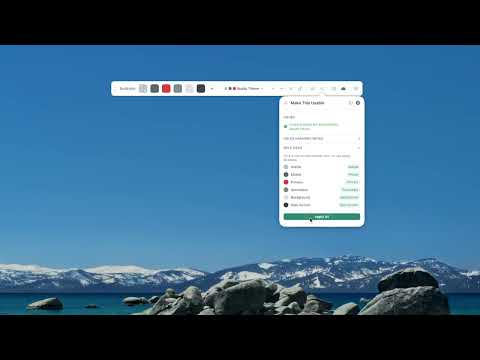
BuddyBar keeps your brand colors one click away in the design tools you already use. Click any color and its code is on your clipboard. No more hunting through old files or switching tabs for that exact shade. BuddyBar sits quietly on the page, and you can drag it wherever it helps. WHAT'S NEW IN 6.3 New • One Check button. The shield and the wand are merged into one button. Check runs every test at once and, if anything needs attention, offers a fix: text that might be hard to read, or colors that look alike to someone with color blindness. Every fix can be undone, and the full breakdown lives in Details. • Group your colors. Groups show as lines on BuddyBar. Hover over a line and the group lifts, so you can see at a glance what's in it. • Share a palette as a link. Share palette copies a link that holds the whole palette, its groups and its color names in the address itself. Nothing is uploaded and no account is needed. Anyone can open the link, then view the palette or save it to their own BuddyBar. • Copy as a Tailwind class, and CSS variables named after the color, like --coral: #FFA69E. Improved • Templates are now Palettes, made, renamed and deleted in one place: the palette list. • See how others see it, right on BuddyBar. Pick a kind of color vision from the eye and BuddyBar redraws your palette the way that person sees it. Copying still copies the real color. • A locked palette is really locked. It can't be renamed, deleted, regrouped or recolored, and BuddyBar tells you which lock to open. • Recent colors and a suggested role in the color editor. • Works with the keyboard and screen readers: named panels, focus that moves in and back, announced messages and visible focus rings. Fixed • Files dropped onto the page with BuddyBar open now reach the design tool underneath. • Opening a palette you already have switches to it instead of making a copy. EVERYTHING BUDDYBAR DOES • One-click copy as HEX, HEX without #, RGB, HSL, a CSS variable or a Tailwind class. • A palette for every brand, client or project, with as many colors as you need, sorted into named groups. • Check for text that won't read and colors that look alike, with a Fix and an Undo for each. • See how others see it: red-green and blue-yellow color vision, drawn right on BuddyBar. • Shade ladders: 10 lighter-to-darker steps of any color. • Eyedropper for any color on the page, and Grab this page's colors to turn a whole page into a palette. • Make a dark version of any palette, with readability fixed automatically. • Lock a color or a whole palette. • Share palettes as a link or a .buddybar file. No account, ever. • Only show when I open it, for days spent reading decks rather than editing them. • Keyboard shortcut: Ctrl+Shift+B (⌃⇧B on Mac) shows and hides BuddyBar. • Syncs with the free Mac and Windows apps on the same computer. WHERE IT WORKS Works in the web design tools you already use. See every supported site at https://buddybar.io PRIVATE BY DESIGN • No account, no sign-up. • Your palettes stay in your browser. BuddyBar sends them nowhere. • A shared palette link carries the colors in the link itself, so nothing is uploaded. • No analytics or tracking in the extension. WANT YOUR COLORS OUTSIDE THE BROWSER? The free Mac and Windows apps put the same BuddyBar over any application, and sync with this extension on their own. Get them at https://buddybar.io HOW TO USE 1. Add BuddyBar to Chrome and pin its icon. 2. Open any supported design tool. BuddyBar appears on the page. 3. Click a color to copy it; right-click to edit it. 4. Press Ctrl+Shift+B to show or hide BuddyBar. Free, with no limits on colors, palettes or use. Questions or feedback? https://buddybar.io/support.html
5 out of 52 ratings
Details
- Version6.3.0
- UpdatedOctober 8, 2026
- Size110KiB
- LanguagesEnglish
- DeveloperWebsite
Email
lucas@ixcreations.com - Non-traderThis developer has not identified itself as a trader. For consumers in the European Union, please note that consumer rights do not apply to contracts between you and this developer.
Privacy

This developer declares that your data is
- Not being sold to third parties, outside of the approved use cases
- Not being used or transferred for purposes that are unrelated to the item's core functionality
- Not being used or transferred to determine creditworthiness or for lending purposes
Support
For help with questions, suggestions, or problems, please open this page on your desktop browser