

BrowseWell

Overview
Use the internet on purpose. Block distractions without blocking the internet you need.
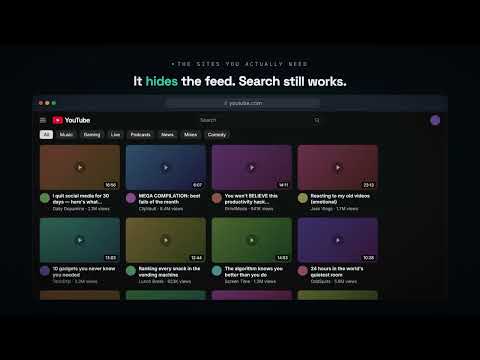
You don't have a willpower problem — the sites you open are engineered to keep you there. And every blocker you've tried failed the same way: the moment it got in the way of real work, you turned it off and never turned it back on. BrowseWell is built for exactly that failure mode. It doesn't block the internet. It helps you use it on purpose. THREE PRECISION TOOLS, NOT ONE HAMMER Blunt blockers force a false choice: block email and miss something important, or leave it open and check it forty times a day. BrowseWell treats different distractions differently. ① BLOCK what's pure distraction • Guard a whole site (facebook.com), one exact page (x.com/home), or a section (reddit.com/r/all/*) — and keep the parts of the site you actually need. • One click guards the page you're on right now. ② GATE what you need but check on reflex (Intentional Sites) Email is the classic case: you can't block it, but you don't need to check it every twenty minutes either. • Mark a site Intentional instead of blocked. Opening it shows a gate: say why you're here, pick a window (2 / 5 / 15 min), and you're in. • A thin bar drains as time runs out. When it's up, the page dims: "Done — close tab" or a small extension. The first extension is one tap; later ones make you re-type your intent, so the escape valve never erodes. • Every site gets a daily check budget. Over-budget visits wait behind a short countdown — with a once-a-day "Urgent — skip the wait" for genuine emergencies. ③ CLEAN UP what's useful but full of traps (Distraction Filters) • Point and click to hide feeds, sidebars, notification counters, recommendation rails — on one page or across a whole site. • Spotlight flips it: keep the one thing you're reading visible and hide everything around it. • YouTube without the homepage feed. LinkedIn without the feed. The useful internet, minus the traps. ———————————————————— RUN FOCUS SESSIONS • 25 / 50 / 90 minutes — or on until you turn it off — with a goal attached. Drift to a distracting site mid-block and BrowseWell asks one thing: does this serve that goal? The usual distractions are covered out of the box. • Keep getting pulled to the same site? One tap makes it gone for the rest of the block. • Set recurring blocks that start on their own, so you never have to remember. Remaining time shows in the popup and on the extension badge. HARD TO DEFEAT — ON PURPOSE The fatal flaw of every blocker is the off switch. BrowseWell's is deliberately inconvenient: • Pausing is never one click. Short pauses need a brief wait; longer or indefinite changes require a typed reflection when you've set Commitment to Locked. Friction scales with how much protection you're removing — and with how many exits you've already taken today. • Re-enabling protection, re-locking early, and starting a focus session are always instant and free. The friction only ever points one way. • Guards survive single-page-app navigation, and gated pages never flash content before the gate. • Remove a guard by mistake? A one-click Undo brings it right back. SEE YOURSELF CLEARLY Insights reflects your week back — time by site, drifts caught, and what percent you turned away at the gate. No streaks, no guilt, no gamification — just honest data, stored on your device, on whether the checking habit is actually shrinking. ———————————————————— PRIVATE BY ARCHITECTURE Local-first. Your rules and browsing data stay in Chrome's storage on your device (and your own Chrome sync, if enabled). No account. No analytics. No tracking. The only thing ever sent off-device is a license key, and only if you choose to buy. TRY EVERYTHING FREE FOR 30 DAYS Full access for 30 days, no account required. Then $5/month or $39/year — with a launch-only founder lifetime option while it lasts. If you stop paying, your existing blocks keep working; you never lose protection you've already built. Only managing Intentional Sites, Commitment levels, and Distraction Filters requires a license. A few reflexive checks an hour add up to hours of scattered attention every week. BrowseWell costs less than one of them. Install BrowseWell, guard your first site in under a minute, and use the internet on your terms.
0 out of 5No ratings
Details
- Version2.1.6
- UpdatedAugust 27, 2026
- Offered bymashrur
- Size238KiB
- LanguagesEnglish
- DeveloperMusaddiqur Rahman
665 8 Street Southwest 605 Calgary, AB T2P 3K7 CAEmail
browsewell.app@gmail.comPhone
+1 403-703-7831 - TraderThis developer has identified itself as a trader per the definition from the European Union and committed to only offer products or services that comply with EU laws.
Privacy

This developer declares that your data is
- Not being sold to third parties, outside of the approved use cases
- Not being used or transferred for purposes that are unrelated to the item's core functionality
- Not being used or transferred to determine creditworthiness or for lending purposes
Support
For help with questions, suggestions, or problems, please open this page on your desktop browser