


Overview
A calm, private, local timeline for browsing history, sessions, saved pages, tags, notes, and collections.
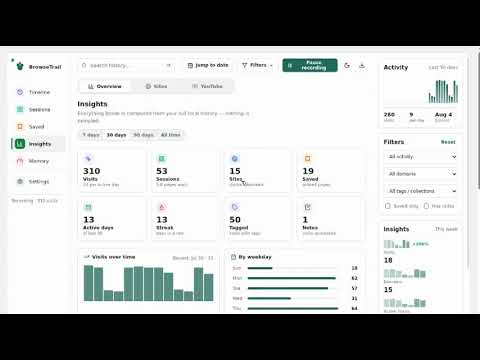
You close a window with a dozen tabs of research. Two days later you need it back — and there is no way back. Chrome kept every one of those URLs, but scattered among hundreds of others, with no record that they belonged together. BrowseTrail rebuilds that. It groups your history into sessions automatically, so you can reopen a whole piece of work in one click — even though you never saved it. WHAT MAKES IT DIFFERENT Session managers like Session Buddy need you to save a session before you close it. You never do, because you did not know you would need it. History managers give you a flat list of individual pages. Neither can put a working set back together after the fact. BrowseTrail can, because it reconstructs sessions from the history you already have. WHAT YOU CAN DO • Reopen a session — see every page in it, untick the noise, and open the rest. • Search your whole history — by title, URL, domain, tag, note or collection. Refine with site:github.com, tag:research, after:2026-05-01, is:saved. • See when you browse — a week-by-hour grid showing the shape of your activity, so you can jump to Tuesday afternoon rather than guessing at dates. • Keep what matters — pin pages, add tags and notes, group research into collections. • Outlive Chrome's limit — Chrome forgets after about three months. BrowseTrail keeps your trail for as long as you choose, including forever. • Export anything — PDF, CSV, HTML or JSON, all generated on your own device. • Control what is recorded — blacklist sites that are never stored, whitelist sites that are never cleaned up, and schedule automatic cleanup if you want it. • 15 languages, light and dark themes. PRIVACY BY CONSTRUCTION BrowseTrail has no account, no server, and nowhere to send your data even if it wanted to. • Everything is stored in your browser's local IndexedDB. • No analytics, telemetry, crash reporting, or advertising. • No content scripts — BrowseTrail never reads the contents of pages you visit. • No host permissions, so it has no access to the sites you browse. • No external API calls, remote scripts, or CDN assets. It requests four permissions: history (to import and record visit metadata), storage (for your settings), alarms (for scheduled local cleanup), and favicon (to show site icons from Chrome's own local cache). Two further permissions are optional and requested only if you open the Memory page: tabs, to list and sleep background tabs, and system.memory, to show how much memory is in use. Decline both and everything else still works. WORTH KNOWING Your data is stored per device and does not sync between computers — use the JSON backup to move it. Deleting a visit in BrowseTrail removes it locally; removing it from Chrome's own history is a separate, explicitly confirmed action. BrowseTrail is developed by NHR Soft.
0 out of 5No ratings
Details
- Version1.0.0
- UpdatedAugust 11, 2026
- Size189KiB
- LanguagesEnglish (United States)
- DeveloperWebsite
Email
tigertclbd@gmail.com - Non-traderThis developer has not identified itself as a trader. For consumers in the European Union, please note that consumer rights do not apply to contracts between you and this developer.
Privacy

This developer declares that your data is
- Not being sold to third parties, outside of the approved use cases
- Not being used or transferred for purposes that are unrelated to the item's core functionality
- Not being used or transferred to determine creditworthiness or for lending purposes
Support
For help with questions, suggestions, or problems, please open this page on your desktop browser