


Overview
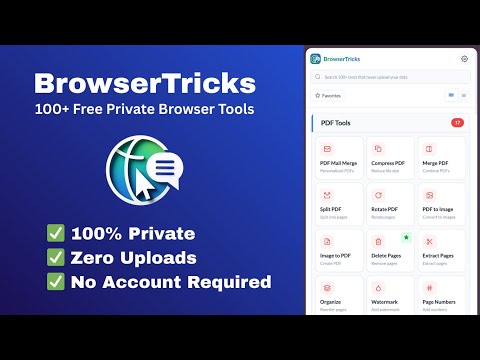
Use 100+ free browser tools. No signup, No data upload. PDF, image, video, and developer utilities - all in your sidebar.
BrowserTricks — 100+ Free Private Browser Tools 🔒 100% Private · Zero Uploads · No Account Required Transform your browser into a powerful productivity suite with 100+ professional tools — all running completely offline in your browser. Your Files and Data NEVER leave your computer. ⸻ WHY CHOOSE BROWSERTRICKS? 🛡️ ABSOLUTE PRIVACY — YOUR DATA STAYS YOURS ✓ Zero Server Uploads — every tool processes files locally ✓ No Cloud Processing — PDFs, images, and documents never touch servers ✓ Works Offline — most tools run without internet ✓ No File Tracking — we don’t see, store, or analyze your content ✓ Enterprise-Grade Privacy — safe for confidential documents ⸻ 💰 100% FREE — NO HIDDEN COSTS ✓ Completely Free Forever — no premium tiers ✓ No Signup Required — start instantly ✓ No Account Creation — zero personal data ✓ No Usage Limits — unlimited processing ✓ No Watermarks — professional output every time ⸻ 🛠️ 100+ POWERFUL TOOLS INCLUDED 📄 PDF TOOLS ✓ Compress PDF — reduce size up to 90% ✓ Merge PDF — combine multiple PDFs ✓ Split PDF — separate pages ✓ Rotate PDF — fix orientation ✓ PDF to Image — JPG / PNG conversion ✓ Image to PDF — create PDFs from photos ✓ Delete Pages — remove unwanted pages ✓ Extract Pages — pull selected pages ✓ Organize PDF — drag & drop reordering ✓ Add Watermark — protect documents ✓ Page Numbers — add pagination ✓ Unlock PDF — remove passwords ✓ Protect PDF — add security ✓ Crop PDF — trim margins ✓ OCR PDF — extract text from scans ✓ Sign PDF — electronic signatures ✓ PDF Mail Merge — personalized bulk PDFs ⸻ 🖼️ IMAGE TOOLS ✓ Compress Images — reduce size without quality loss ✓ Resize Images — precise dimensions ✓ Crop Images — remove unwanted areas ✓ Rotate Images — fix orientation ✓ Add Watermark — brand photos ✓ Convert to JPG — universal format ✓ Convert from JPG — PNG, WebP & more ✓ Photo Editor — full-featured editing ⸻ 🎬 VIDEO TOOLS ✓ Compress Video — shrink large files ✓ Convert Video — MP4, WebM, MOV & more ✓ Merge Videos — combine clips ✓ Trim Video — cut precisely ✓ Change Speed — slow or fast motion ✓ Remove Audio — silent video extraction ⸻ 📊 DATA TOOLS ✓ Test File Generator — any type & size ✓ JSON Formatter — beautify & validate ✓ JSON ↔ YAML — bidirectional conversion ✓ JSON ↔ CSV — data translation ✓ JSON ↔ XML — format interchange ✓ XML Formatter — pretty-print XML ✓ SQL Formatter — clean queries ✓ YAML Formatter — tidy configs ✓ HTML Formatter — beautify code ✓ CSS Formatter — organize styles ✓ JavaScript Formatter — clean JS ⸻ 🔐 CRYPTOGRAPHY & SECURITY ✓ Hash Generator — MD5, SHA-1, SHA-256, SHA-512 ✓ HMAC Generator — keyed authentication ✓ Bcrypt / Scrypt — secure password hashing ✓ AES Encryption — military-grade security ✓ Password Generator — strong random passwords ✓ UUID / ULID Generator — unique identifiers ⸻ 🌐 WEB UTILITIES ✓ RegEx Tester — syntax-highlighted testing ✓ Color Picker — professional color selection ✓ QR Code Generator — custom QR codes ✓ QR Code Reader — decode QR images ✓ SVG Optimizer — compress vectors ✓ Image to Base64 — embed images in code ⸻ 🔒 OUR PRIVACY PROMISE Unlike other tool websites that upload files to servers, BrowserTricks works entirely in your browser. ✓ Confidentiality — files stay on YOUR computer ✓ Security — zero server-side data breach risk ✓ Speed — instant processing, no uploads ✓ Reliability — works even with poor internet ⸻ 🚀 GET STARTED IN SECONDS ✓ Install the extension ✓ Open the Side Panel ✓ Search your tool ✓ Process files instantly No signup. No email. No payment. Just productivity.
5 out of 53 ratings
Details
- Version1.0.0
- UpdatedJanuary 13, 2026
- Size119KiB
- LanguagesEnglish
- DeveloperBrowserTricksWebsite
Bhadrappa Layout Service Rd Bhadrappa Layout, Koti Hosahalli Bengaluru, Karnataka 560092 INEmail
browsertrickscom@gmail.com - Non-traderThis developer has not identified itself as a trader. For consumers in the European Union, please note that consumer rights do not apply to contracts between you and this developer.
Privacy

BrowserTricks - Free Private Tools has disclosed the following information regarding the collection and usage of your data. More detailed information can be found in the developer's privacy policy.
BrowserTricks - Free Private Tools handles the following:
This developer declares that your data is
- Not being sold to third parties, outside of the approved use cases
- Not being used or transferred for purposes that are unrelated to the item's core functionality
- Not being used or transferred to determine creditworthiness or for lending purposes
Support
For help with questions, suggestions, or problems, please open this page on your desktop browser