Item logo image for Browser's external editor

Browser's external editor

3.7(

3 ratings

)
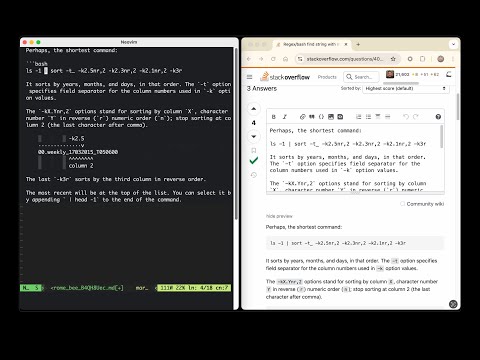
Item media 4 (screenshot) for Browser's external editor
Item video thumbnail
Item media 2 (screenshot) for Browser's external editor
Item media 3 (screenshot) for Browser's external editor
Item media 4 (screenshot) for Browser's external editor
Item video thumbnail
Item media 2 (screenshot) for Browser's external editor
Item media 3 (screenshot) for Browser's external editor
Item media 4 (screenshot) for Browser's external editor

Overview

Allows to edit form text fields with an external editor

There are two steps to follow before using the extension after installation: - Configure the extension: https://github.com/rosmanov/chrome-bee/wiki/Configuration-in-Chrome - Install a native messaging host application: https://github.com/rosmanov/chrome-bee/wiki/Installing-Host-Application

Details

  • Version
    3.4.2
  • Updated
    October 3, 2025
  • Offered by
    Ruslan Osmanov
  • Size
    40.75KiB
  • Languages
    2 languages
  • Developer
    Email
    rrosmanov@gmail.com
  • Non-trader
    This developer has not identified itself as a trader. For consumers in the European Union, please note that consumer rights do not apply to contracts between you and this developer.

Privacy

The developer has disclosed that it will not collect or use your data.

This developer declares that your data is

  • Not being sold to third parties, outside of the approved use cases
  • Not being used or transferred for purposes that are unrelated to the item's core functionality
  • Not being used or transferred to determine creditworthiness or for lending purposes

Support

Related

Surfingkeys

4.7

Rich shortcuts to click links/switch tabs/scroll, capture pages, use your browser like vim for productivity.

Design Mode - Page's Rich Text Editor

4.7

Edit any page's content by switching to design mode, where you can modify the content and drag images around like a Word Editor

Browserpass

4.7

Browser extension for zx2c4's pass (password manager)

Vim for Google Docs™

3.7

Vim for Google Docs: Supercharge Your Typing With Vim

GhostText

4.8

Write in the browser with your text editor.

Browser Links

4.0

Quick access to Chrome pages in the context menu.

VIM typer

3.3

Use VIM keys in browser

Google Docs Exam Environment

3.9

Facilitate writing exams via Google Docs by hiding unwanted items

External Application Launcher

4.3

Run any external application with custom arguments from the browser toolbar or context menu to send links, text and more

Extensions Steward

4.6

Extensions Steward, Extensions Manager

Super Bookmark Desktop

4.4

Super Bookmark Desktop - the new tab page + bookmark manager that acts like your computer desktop!…

Clear Code

3.6

Syntax highlighting and beautifiers for embedded code examples.

Surfingkeys

4.7

Rich shortcuts to click links/switch tabs/scroll, capture pages, use your browser like vim for productivity.

Design Mode - Page's Rich Text Editor

4.7

Edit any page's content by switching to design mode, where you can modify the content and drag images around like a Word Editor

Browserpass

4.7

Browser extension for zx2c4's pass (password manager)

Vim for Google Docs™

3.7

Vim for Google Docs: Supercharge Your Typing With Vim

GhostText

4.8

Write in the browser with your text editor.

Browser Links

4.0

Quick access to Chrome pages in the context menu.

VIM typer

3.3

Use VIM keys in browser

Google Docs Exam Environment

3.9

Facilitate writing exams via Google Docs by hiding unwanted items

Google apps