


Overview
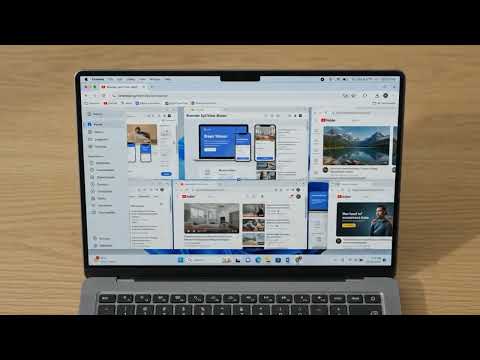
Open and compare up to 16 websites side by side in one Chrome window, with sync scrolling, saved layouts, and screenshot capture.
🔲 Split Any Website into Up to 16 Resizable Panels Browser SplitView Master is a Chrome extension that lets you view, compare, and interact with up to 16 websites simultaneously inside a single Chrome window for development, responsive testing, research, dashboard monitoring, and everyday multitasking. 🚀 Why use this extension? It is designed for workflows that require comparing multiple websites, monitoring dashboards, researching information, or testing web applications—all within a single Chrome window. It lets you organize multiple websites inside a single Chrome window while keeping your desktop clean. ⚙️ Designed for modern web workflows • View up to 16 websites simultaneously in split view • Multiple split-screen layouts • Vertical, horizontal, and grid layouts • Independently resizable panels • Optional synchronized scrolling for website comparison • Save and restore your favorite layouts • Viewport screenshot capture • Reader Mode • Supports over 50 languages • Lightweight and privacy-first 🏗️ Build Your Ideal Workspace Every workflow is different. Choose from layouts ranging from a simple two-panel comparison to a sixteen-panel workspace. Resize any split view panel at any time using intuitive drag handles without interrupting your multitasking session. ⚖️ Compare Websites Side by Side Compare production and staging environments, desktop and mobile layouts, documentation, dashboards, or any websites side by side without switching tabs. 🔄 Synchronized Scrolling Keep multiple websites aligned while scrolling. Synchronized scrolling helps you quickly compare translated content, review documentation alongside applications, and verify contracts or technical manuals without losing your place. Enable or disable synchronized scrolling whenever you need independent side-by-side browsing. 💾 Save Layouts & Sessions Every project has a different workflow. Save your preferred layouts and restore them instantly whenever you return to a project. Create dedicated workspaces for development, research, monitoring, and daily productivity so you can stop rebuilding the same layouts every day. 📱 Responsive Website Testing The extension helps developers and QA teams compare layouts across different viewport sizes without constantly resizing browser windows. It simplifies mobile layout reviews, tablet previews, and desktop comparisons for faster UI validation and CSS debugging. 📸 Screenshot Capture Capture individual browser panels without taking screenshots of your entire desktop. This integrated tool simplifies bug reporting, design feedback, and creating visual documentation or tutorials. 📖 Reader Mode Focus on content instead of distractions. Reader Mode removes unnecessary page elements so you can concentrate on articles, blogs, documentation, tutorials, and knowledge bases. Perfect for reading long-form content while keeping reference material visible in adjacent browser panels in split view. ⚡ Built for Performance The extension is lightweight and designed for fast, efficient multi-panel browsing. Everything happens inside a single Chrome window, helping reduce desktop clutter and making browser multitasking more efficient. 🌍 Global Multilingual Support The extension UI is natively localized into over 50 languages. It automatically adapts to your browser's language setting for a seamless experience globally. 🎯 Built for Professionals This extension is ideal for anyone who regularly works with multiple websites at the same time. Developers and QA engineers can streamline responsive testing, debug code, and compare staging with production environments. Designers can ensure visual consistency across layouts. Researchers, students, and writers can easily compare multiple sources, edit translations, and take notes. Customer support teams and project managers can organize multiple dashboards seamlessly alongside their primary tools. ❓ Frequently Asked Questions Can I view multiple websites in one browser window? Yes. The extension lets you display up to 16 independently resizable browser panels inside a single Chrome window. Can I save layouts? Absolutely. Save your preferred browser layout and restore it instantly whenever you return to a project. Does it support synchronized scrolling? Yes. Enable synchronized scrolling whenever you need multiple webpages to stay aligned while browsing or comparing content. 🔒 Privacy First Your browsing belongs to you. The extension is designed with privacy in mind. • No account required • No browsing history collection • No tracking of your browsing activity • Works locally on your device 💡 Work Smarter Whether you're developing, researching, testing, monitoring dashboards, or simply multitasking, the extension helps you organize everything inside a single Chrome window. View, compare, and work across up to 16 websites in a single Chrome window.
5 out of 52 ratings
Details
- Version1.8.0
- UpdatedAugust 25, 2026
- Size121KiB
- Languages51 languages
- DeveloperWebsite
Email
anuj@ssinternet.in - Non-traderThis developer has not identified itself as a trader. For consumers in the European Union, please note that consumer rights do not apply to contracts between you and this developer.
Privacy

This developer declares that your data is
- Not being sold to third parties, outside of the approved use cases
- Not being used or transferred for purposes that are unrelated to the item's core functionality
- Not being used or transferred to determine creditworthiness or for lending purposes
Support
For help with questions, suggestions, or problems, please open this page on your desktop browser