

Browser FX: Tab Audio Effects + MIDI
8 ratings
)
Overview
Real-time audio effects for any tab: reverb, filter, EQ, bitcrusher, delay + 18 more. Chain 4 effects, presets, MIDI control.
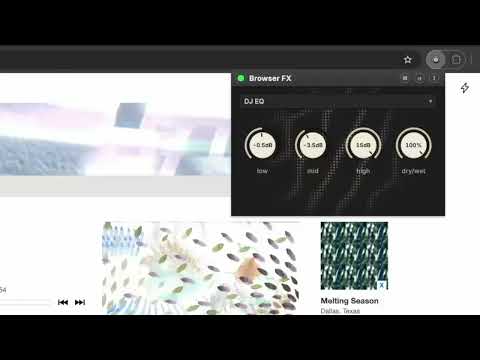
Browser FX transforms your web audio experience with real-time professional audio effects. Capture any tab's audio, chain up to 4 effects, and shape the sound with studio-style knobs, an audio-reactive cymatic visualizer, and hands-on control from your MIDI controller. WHAT IT DOES TO YOUR AUDIO: There are 23 effects, and they fall into a few families. Some degrade the signal on purpose, crushing it down to a few bits, skipping like a scratched CD, or warping it like worn tape. Some add space and echo, with two flavors of reverb and two of delay. Some move the sound around while it plays, sweeping filters, swirling the stereo image, and wobbling pitch or volume. The rest are the practical ones you would find on a mixing desk: EQ, compression, pitch shifting, and a Utility for gain, pan, and stereo width. EFFECT CHAINS: Stack up to 4 effects and run them in series: bitcrush into reverb, filter into delay into tape. Drag to reorder the chain, switch each effect on and off without a click or pop, and even double up the same effect for extreme sounds. NEW: UTILITY AND MONO Utility is the everyday device the other 22 aren't: gain, pan, and stereo width on three knobs. Turn Width fully down to sum a track to mono, leave it centered to pass audio untouched, or push past center to widen the stereo image. Handy for one-earbud listening, for taming a badly panned mix, or just for adjusting level without reaching for the tab. There's a Mono preset that sets it up in one click. PRESETS: Eight presets to start from, including Lo-Fi Radio, Chopped & Screwed, Dub Echo and Mono. Load one and turn some knobs, then save the result as your own. Your presets store their MIDI mappings too, so loading one brings back your controller layout along with the sound. MIDI CONTROL: Map any MIDI controller with one-click MIDI learn: knobs control parameters, pads and buttons punch effects in and out. Mappings stick to each effect (even when you reorder the chain), and your controller keeps working with the popup closed. KEY FEATURES: • Real-time audio processing on any website • Chain up to 4 effects with drag-to-reorder and per-effect bypass • Eight built-in presets, plus your own saved with their MIDI mappings • Per-tab effects, run different chains on different tabs • Hardware MIDI control: knobs for parameters, pads for effect on/off • Studio-inspired interface with responsive knobs and per-effect color themes • Audio-reactive cymatic visualizer, a Chladni plate pattern driven by your sound • Live parameter adjustment while audio plays • Full stereo processing, with mono summing and width control when you want it • Settings automatically saved per tab WHO IT'S FOR: Anyone who wants more control over the audio coming out of a browser tab, whether that's roughing up a music stream, adding echo to a video, or summing a badly mixed track to mono so it works in one earbud. SIMPLE TO USE: 1. Click the Browser FX icon 2. Load a preset, or choose an effect and stack up to 4 3. Press the power button 4. Twist the knobs in real time, on screen or from your MIDI controller 5. Enjoy PRIVACY FIRST: All audio processing happens locally in your browser using the Web Audio API. No data collection, no external servers, complete privacy. MIDI access is optional and only used if you enable it.
5 out of 58 ratings
Details
- Version0.3.0
- UpdatedAugust 28, 2026
- Offered bybruceblay
- Size123KiB
- LanguagesEnglish (United States)
- Developer
Email
bruceblay@gmail.com - Non-traderThis developer has not identified itself as a trader. For consumers in the European Union, please note that consumer rights do not apply to contracts between you and this developer.
Privacy

This developer declares that your data is
- Not being sold to third parties, outside of the approved use cases
- Not being used or transferred for purposes that are unrelated to the item's core functionality
- Not being used or transferred to determine creditworthiness or for lending purposes
Support
For help with questions, suggestions, or problems, please open this page on your desktop browser